GitHub Deploy Website
As promised we will look to see how we can use CICD Slides to deploy a website using GitHub actions with GitHub pages.
- The assumption here is that you have your GitHub repo and that it has
*.html,*.js,*.css. - GitHub pages are powered by Jekyll
1. Some background on GitHub Pages
GitHub Pages is a free service that lets you publish public websites directly from your GitHub repositories, either on the github.io domain or on a custom domain of your choice. Behind the scenes, it’s powered by Jekyll, a popular static site generator that integrates seamlessly with GitHub Pages to make building and customizing websites straightforward.
Whenever you push your source files, GitHub Pages automatically generates and deploys your site. And if you prefer to work with plain HTML, that’s no problem — Jekyll simply treats files without front matter as static assets, so you can publish generated HTML without any extra setup.
Vanillia Jekyll site: https://compeng0001.github.io/
2. GitHub workflows
To get GitHub to automate a build for a website we need to create a workflow for GitHub actions using a .github/workflows/*.yml file.
-
Create the following folders and file.
-
Open the file,
.github/workflows/pages.yml, using your preferred text editor i.e. VSCode, vim, nano. -
First we need to give our workflow a name, at the top of the file add this:
-
After this we need to tell GitHub actions when to use this workflow. Underneath
name: pagesadd the following:-
[Line 3] To automatically trigger a workflow, use
onto define which events can cause the workflow to run.- For a list of all available events, see: Events that trigger worflows
-
[Line 4] When ever a
git pushfrom a branch or tag is event is caught by GitHub actions then thepush:is checked for which branch or tag. Here we are usingbranches: [ main ]more branches can be specified inbranches: [ main ... ]
-
-
Next we need to give the workflow permissions to access information in your repository - secruity is important! Add the following:
-
[line 8]
contents: read— allows the workflow to read the repository’s files and metadata, which is required to build or process the project but does not permit any modifications. -
[line 9]
pages: write— allows the workflow to publish, update, or manage GitHub Pages content produced during the build. -
[line 10]
id-token: write— enables the workflow to request an OpenID Connect (OIDC) token, allowing secure, short-lived authentication with external services (e.g., cloud deployments) without storing long-term secrets.
-
-
Now that permissions have been set we can sort out the ....
-
[line 13]
group: "pages"— assigns all runs of this workflow to a shared concurrency group named pages, ensuring only one deployment job for this group runs at a time. -
[line 14]
cancel-in-progress: true— automatically stops any currently running job in the same group when a new run starts, preventing overlapping or conflicting page deployments.
-
-
With all the preconfiguration set up we now need to describe two
jobsfirst will bebuildfollowed bydeploy.7.1 Lets start by declaring our first job, reproduce the following:
jobs: build: runs-on: ubuntu-latest steps: - name: Checkout uses: actions/checkout@v4 - name: Prepare site run: | rm -rf _site mkdir -p _site cp -r home.html css js assets _site/ touch _site/.nojekyll - name: Upload artifact uses: actions/upload-pages-artifact@v3 with: path: _site-
[line 16]
jobs:Defines the workflow’s collection of tasks; each job runs independently within a GitHub Actions runner. -
[line 17]
build:Names this specific job, which will prepare and package the site for deployment. -
[line 18]
runs-on: ubuntu-latest: Specifies the virtual machine image the job uses; here it runs inside GitHub’s latest Ubuntu environment. -
[line 19]
steps: Lists the sequential actions executed inside the job’s runner environment. -
[line 20]
- name: CheckoutA descriptive label for the step that retrieves the repository source code into the runner. -
[line 21]
uses: actions/checkout@v4Invokes the official checkout action, giving the runner access to the repository files needed for building the site. -
[line 23]
- name: Prepare siteLabels the step responsible for assembling the static site output in a dedicated directory. -
[line 24]
run: |Indicates that the following multiline shell script will be executed directly on the Ubuntu runner. -
[lines 25-28] a series of to prepare the sites files and structure.
-
[line 32]
with:Introduces inputs for the action. -
[line 33]
path: _siteSpecifies the directory to upload as the site artifact; GitHub Pages will later deploy this folder as the published website.
7.2 The next job is
deploy, ensure you match indentation,deploybelongs underjobs:deploy: environment: name: github-pages url: ${{ steps.deployment.outputs.page_url }} runs-on: ubuntu-latest needs: build steps: - name: Deploy to GitHub Pages id: deployment uses: actions/deploy-pages@v4-
[line 35]
deploy:Defines a job responsible for publishing the site to GitHub Pages. -
[line 36]
environment:Associates the job with a specific deployment environment in GitHub. -
[line 37 ]
name: github-pagesTargets the predefined GitHub Pages environment so that deployment history, protection rules, and environment URLs integrate correctly. -
[line 38]
url: ${{ steps.deployment.outputs.page_url }}Records the final published page URL as the environment’s link by pulling it from the deployment step’s output. -
[line 40]
needs: buildEnsures this deployment job waits for thebuildjob to finish successfully before running. -
[line 43]
id: deploymentAssigns an identifier so other parts of the job can reference this step’s outputs—such as the generated page URL. -
[line 44]
uses: actions/deploy-pages@v4Invokes the official Pages deployment action, which takes the previously uploaded artifact and publishes it to GitHub Pages.
-
2. Deploying
-
So now we can add, commit, and push to trigger the workflow.
-
If you are quick you can navigate to the actions tab in GitHub and watch the deployment via the workflow in realtime.

-
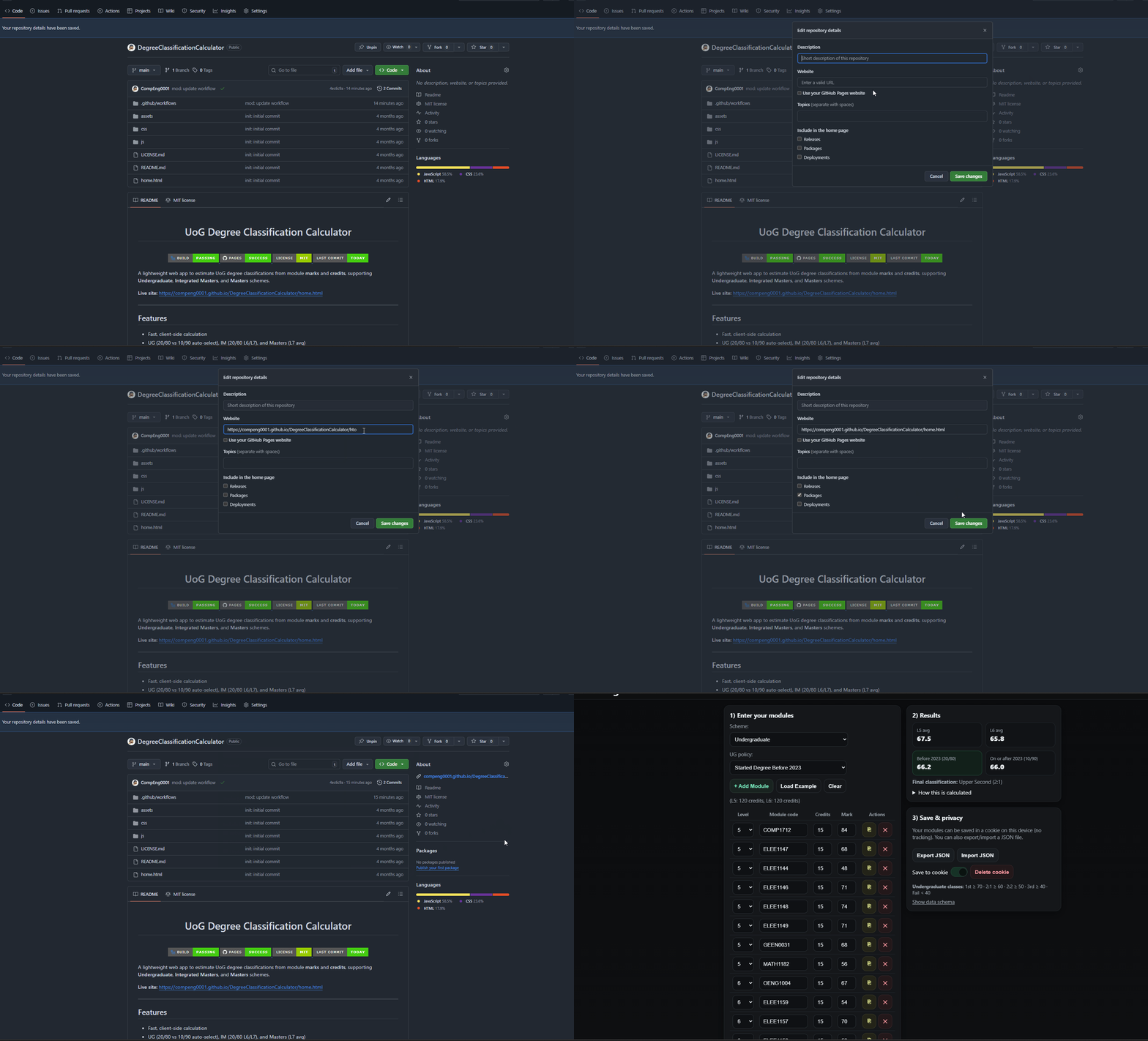
For quick access update the About section to use the GitHub pages as the URL:
-
So you should then click the link and you should see your website deployed in the real world, SUCCESS!
3. Full workflow here
.github/workflows/pages.yml {44 lines}
.github/workflows/pages.yml {44 lines}
name: pages
on:
    push:
        branches: [ main ]
permissions:
    contents: read
    pages: write
    id-token: write
concurrency:
    group: "pages"
    cancel-in-progress: true
jobs:
    build:
        runs-on: ubuntu-latest
        steps:
        - name: Checkout
            uses: actions/checkout@v4

        - name: Prepare site
            run: |
            rm -rf _site
            mkdir -p _site
            cp -r home.html css js assets _site/
            touch _site/.nojekyll

        - name: Upload artifact
            uses: actions/upload-pages-artifact@v3
            with:
            path: _site
  deploy:
    environment:
      name: github-pages
      url: ${{ steps.deployment.outputs.page_url }}
    runs-on: ubuntu-latest
    needs: build
    steps:
      - name: Deploy to GitHub Pages
        id: deployment
        uses: actions/deploy-pages@v4