Continuous Integration and Continuous Deployment

let module = Module {
    code: "COMP1856".to_string(),
    name: "Software Engineering".to_string(),
    credits: 15,
    module_leader: "Seb Blair BEng(H) PGCAP MIET MIHEEM FHEA".to_string(),
}
CICD

Software Build Technology and CI/CD

  • What do we mean by a Build?
    • Assemble the correct source code depending on
      • Hardware
      • Operating System
      • Application Requirements

    • Compile

    • Perform tests and QA on source code and binary code

    • Package source code and binary code for different production systems

    • Create documentation
CICD

Build Automation


  • Build automation is the act of scripting or automating a wide variety of tasks that software developers do in their day-to-day activities to achieve the build process.

  • This is one of the important practices used in agile projects

  • Automation is not an option, it is a requirement
CICD

Advantages of Build Automation


  • Improve development process; product quality and reduce the cost of QA

    • Accelerate the compile and link processing
    • Eliminate redundant tasks
    • Minimise “Bad Builds” (if regression tests fail, automatic reporting will let you know, you can revert t an earlier build)
    • Eliminate dependencies on key personnel
    • Have history of builds and releases in order to investigate issues
    • Save time and money
  • Support the role of the installer who is not the user or developer, also has no IDE to use. Think organisation IT Support.

CICD

Types of Build Automation


  • On-demand automation such as a user running a script at the command line

  • Scheduled automation such as a continuous integration server running a nightly build

  • Triggered automation such as a continuous integration server running a build on every commit to a version control system
CICD

Continuous Integration


  • This is a development practice that calls upon development teams to ensure that a build and subsequent testing is conducted for every code change made to a software program.

  • Continuous integration was first introduced in the year 2001 with the software known as Cruise Control

  • Continuous Integration has become a key practice in any software organisation
CICD

Continuous Integration

CICD

CI/CD

  • Continuous Integration:
    • “Developers practicing continuous integration merge their changes back to the main branch as often as possible. The developer's changes are validated by creating a build and running automated tests against the build. By doing so, you avoid the integration hell that usually happens when people wait for release day to merge their changes into the release branch.”

  • Continuous Deployment:
    • “…every change that passes all stages of your production pipeline is released to your customers. There's no human intervention, and only a failed test will prevent a new change to be deployed to production.”
CICD

CI/CD Pipelines

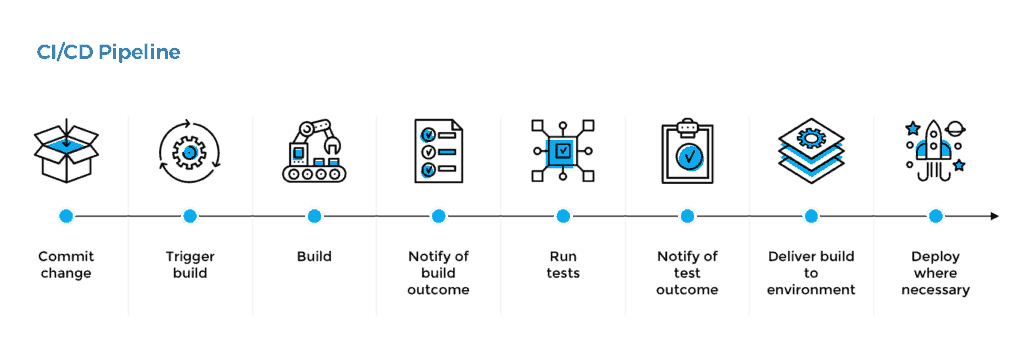
  • Modern CI and CD practices are referred to as a CI/CD pipeline and can handle every stage of the build process from commit to deployment.

CICD

CI/CD Pipelines

CICD

CI/CD Tools

  • Apache Ant
  • Azure Pipelines
  • Chef
  • Github Actions
  • Gradle
  • Jenkins
  • Maven
  • Octopus Deploy
  • Travis CI
  • TeamCity
CICD

How GitHub Actions Work

  1. Triggers: Define events to start workflows (e.g., push, pull_request, schedule).
  2. Workflow: A collection of jobs defined in a YAML file.
  3. Jobs: Independent units, each with multiple steps.
  4. Actions: Individual tasks in a workflow.
on:
  push:
    branches:
      - main
jobs:
  build:
    runs-on: ubuntu-latest
    steps:
      - name: Checkout code
        uses: actions/checkout@v3
      - name: Set up Node.js
        uses: actions/setup-node@v3
        with:
          node-version: '16'
      - name: Install dependencies
        run: npm install
      - name: Run tests
        run: npm test
CICD

Benefits of GitHub Actions

  • Automation:
    • Automated builds, tests, and deployments.

  • Scalability:
    • Run workflows in parallel.

  • Integration:
    • Connect with cloud providers, databases, and third-party tools.

  • Community Support:
    • Use and contribute to the GitHub Marketplace.
CICD

Setting Up GitHub Actions

  1. Create a .github/workflows folder:
    • Store workflow YAML files here.

  2. Define a Workflow:
    • Specify triggers, jobs, and steps.

  3. Use Marketplace Actions:
    • Pre-built solutions for common tasks.

name: deploy-content
concurrency: deploy-content
on:
  push:
    branches: [ main ]

jobs:
  build:
    runs-on: ubuntu-latest
    steps:

      - name: checkout repo
        uses: actions/checkout@v4

      - name: make build directory
        run:  mkdir build/ && cp -r figures build/figures

      - name: build index
        uses: docker://marpteam/marp-cli:latest
        with:
          args: index.md -o build/index.html
        env:
          MARP_USER: root:root

      - name: build content html
        uses: docker://marpteam/marp-cli:latest
        with:
          args: -I content/ -o build/content/ --html --allow-local-files --theme themes/uog-theme.css
        env:
          MARP_USER: root:root
  
      - name: deploy content
        if: ${{ github.event_name == 'push' }}
        uses: JamesIves/github-pages-deploy-action@v4
        with:
          branch: gh-pages
          folder: ./build/ 
CICD

Example: Deploying a Static Website

name: Deploy Website

on:
  push:
    branches:
      - main

jobs:
  deploy:
    runs-on: ubuntu-latest
    steps:
      - name: Checkout code
        uses: actions/checkout@v3
      - name: Build website
        run: |
          npm install
          npm run build
      - name: Deploy to GitHub Pages
        uses: peaceiris/actions-gh-pages@v3
        with:
          github_token: ${{ secrets.GITHUB_TOKEN }}
          publish_dir: ./dist
CICD

Example: Deploying a Lectures Website

name: deploy-content
concurrency: deploy-content
on:
  push:
    branches: [ main ]

jobs:
  build:
    runs-on: ubuntu-latest
    steps:

      - name: checkout repo
        uses: actions/checkout@v4

      - name: make build directory
        run:  mkdir build/ && cp -r figures build/figures

      - name: build index
        uses: docker://marpteam/marp-cli:latest
        with:
          args: index.md -o build/index.html
        env:
          MARP_USER: root:root

      - name: build content html
        uses: docker://marpteam/marp-cli:latest
        with:
          args: -I content/ -o build/content/ --html --allow-local-files --theme themes/uog-theme.css
        env:
          MARP_USER: root:root
  
      - name: deploy content
        if: ${{ github.event_name == 'push' }}
        uses: JamesIves/github-pages-deploy-action@v4
        with:
          branch: gh-pages
          folder: ./build/ 
CICD

Debugging Workflows

  • Workflow Logs:

    • Access logs via the Actions tab.
  • Enable Debugging:

    • Use ACTIONS_STEP_DEBUG for detailed logs.
  • Common Issues:

    • Missing secrets or tokens.
    • Incorrect syntax in YAML files.

<div class="columns-2" > <div style="padding-top:250px"> - Modern CI and CD practices are referred to as a CI/CD pipeline and can handle every stage of the build process from commit to deployment. </div> <div style="padding-top:225px"> ![w:900 invert](../../figures/cicdPipelines.png) </div> </div>