GitHub Profile
In today’s job market, a CV alone rarely tells the full story of what you can do. Employers want evidence — real examples of your skills, your thinking, and the impact of your work. A digital portfolio gives you exactly that. It turns your experience into something visible, verifiable, and memorable.
For developers, a GitHub profile is one of the most powerful forms of a digital portfolio. It shows your code, your problem‑solving approach, your collaboration style, and your commitment to learning. A well‑crafted GitHub Profile README ties it all together into a compelling first impression.
1. Creating a GitHub Profile README
A special repository named <username>/<username> that displays a README on your GitHub profile.
If you already have the special repository - some of you did this week 1 and 2 - you can skip to Next Section
-
Go to GitHub
-
Create a new repo named exactly with your GitHub username
-
Check “Add a README”
-
Open the README in the GitHub editor or VS Code
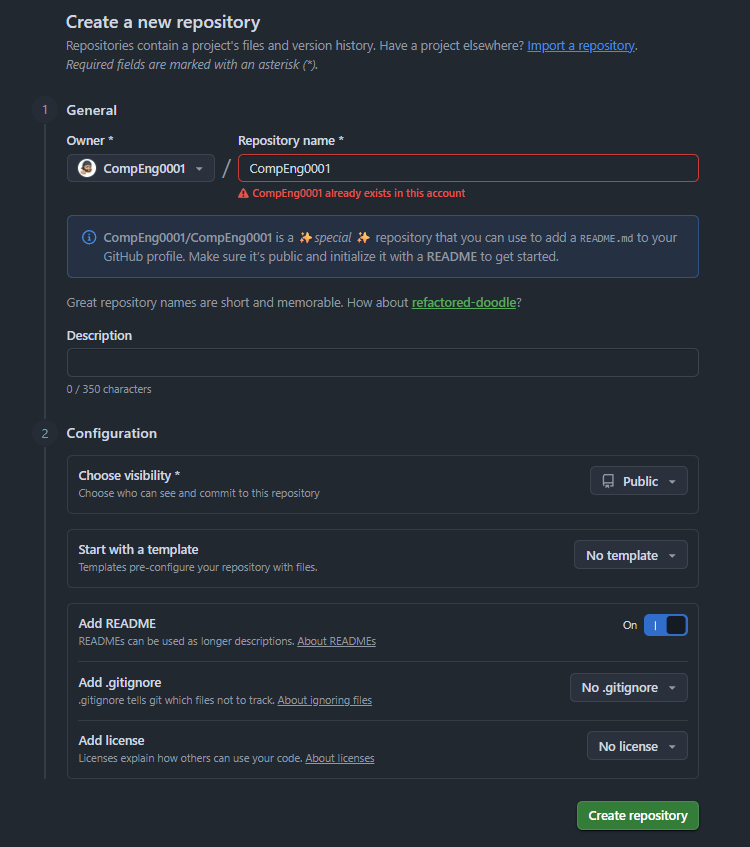
The screen shot above shows the how you would do this.
As you can see I have a error in red, this repo already exists under my username.
2. Title/Top level infomation
-
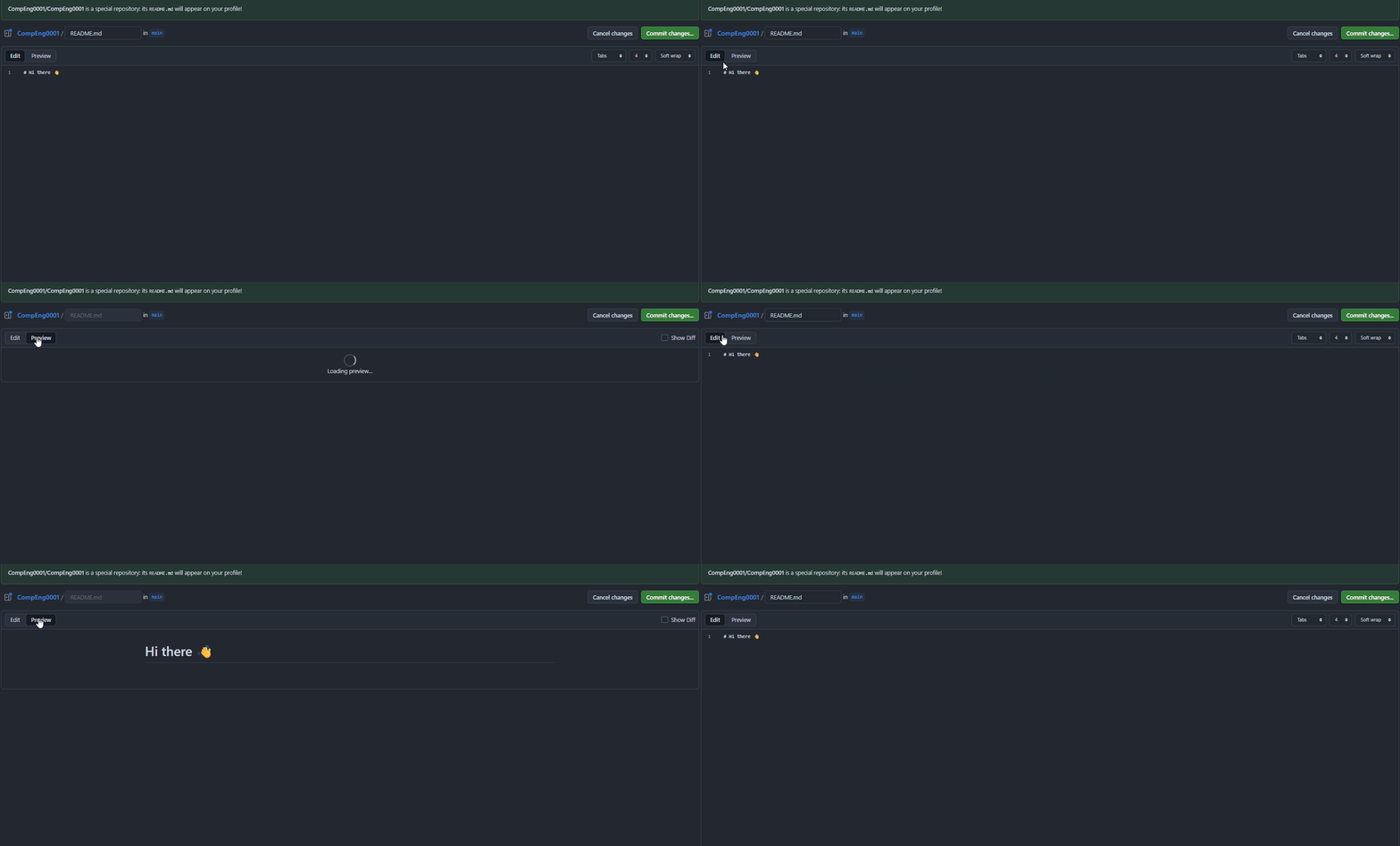
You can modify the README me in the browser, by clicking the pen icon
 .
. -
The page should like this, you can swap between edit and preview mode:
-
Start with a greeting with a level 1 heading
# -
Add an opening sentence/paragraph on line 3, remember you can preview whenever you want.
3. Add some skils
-
You can use badges or just list them, but badges look better (we are going to use https://img.shields.io), for example:
-  -  -  -  -


4. Pinning your repos
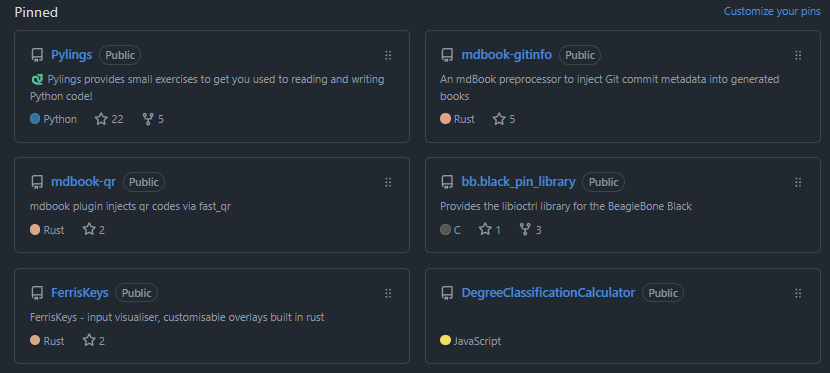
- If you commit your README, you should see Pinned at the bottom of the page - this lets your pin your repos ( at most 6 of your best repos)
5. Useful links
6. Template to get started:
Click to see template
Click to see template
# Hi, I'm [Your Name]
## About Me
I'm a [role or focus] who loves working with [technologies/interests].
I enjoy building projects that [your motivation or mission].
## Skills
- 
- 
- 
- 
## Featured Projects
### [Project Name](GitHub link)
Short description of what it does and why it matters.
### [Project Name](GitHub link)
Short description.
### [Project Name](GitHub link)
Short description.
## Currently Learning
- Item 1
- Item 2
7. My README
GitHub markdown let's you use html too, so my profile takes advantage of that.
Click to see mine..
Click to see mine..
<div align="center">
<a href="https://github.com/CompEng0001">
<img src="https://github.com/user-attachments/assets/18e861c1-afe7-4e68-88e3-00fa53db1c8e" alt="CompEng0001" style="width:350px">
</a>
[](https://git.io/typing-svg)
</div>
<br/>
<p align="left">
<img src="./moss.gif" alt="moss_rage" align="right" style="width:325px">
<!-- Languages -->
<img src="https://img.shields.io/badge/C-00599C?style=for-the-badge&logo=c&logoColor=white" alt="C" />
<img src="https://img.shields.io/badge/C++-00599C?style=for-the-badge&logo=c%2B%2B&logoColor=white" alt="C++" />
<img src="https://img.shields.io/badge/Rust-000000?style=for-the-badge&logo=rust&logoColor=white" alt="Rust" />
<img src="https://img.shields.io/badge/Kotlin-7F52FF?style=for-the-badge&logo=kotlin&logoColor=white" alt="Kotlin" />
<img src="https://img.shields.io/badge/Python-3776AB?style=for-the-badge&logo=python&logoColor=white" alt="Python" />
<img src="https://img.shields.io/badge/JS-F7DF1E?style=for-the-badge&logo=javascript&logoColor=black" alt="JavaScript" />
</p>
<p align="left">
<!-- Tools & DevOps -->
<img src="https://img.shields.io/badge/Bash-4EAA25?style=for-the-badge&logo=gnubash&logoColor=white" alt="Bash" />
<img src="https://img.shields.io/badge/Git-F05032?style=for-the-badge&logo=git&logoColor=white" alt="Git" />
<img src="https://img.shields.io/badge/GH-181717?style=for-the-badge&logo=github&logoColor=white" alt="GitHub" />
<img src="https://img.shields.io/badge/GH Actions-2088FF?style=for-the-badge&logo=githubactions&logoColor=white" alt="GitHub Actions" />
<img src="https://img.shields.io/badge/MD-000000?style=for-the-badge&logo=markdown&logoColor=white" alt="Markdown" />
</p>
<p align="left">
<!-- Editors & IDEs -->
<img src="https://img.shields.io/badge/VS%20Code-007ACC?style=for-the-badge&logo=visual-studio-code&logoColor=white" alt="VS Code" />
<img src="https://img.shields.io/badge/VS-5C2D91?style=for-the-badge&logo=visual-studio&logoColor=white" alt="Visual Studio" />
<img src="https://img.shields.io/badge/IntelliJ-000000?style=for-the-badge&logo=intellijidea&logoColor=white" alt="IntelliJ IDEA" />
<img src="https://img.shields.io/badge/AStudio-3DDC84?style=for-the-badge&logo=androidstudio&logoColor=white" alt="Android Studio" />
<img src="https://img.shields.io/badge/Vim-019733?style=for-the-badge&logo=vim&logoColor=white" alt="Vim" />
</p>
<p align="left">
<!-- Operating Systems -->
<img src="https://img.shields.io/badge/Linux-FCC624?style=for-the-badge&logo=linux&logoColor=black" alt="Linux" />
<img src="https://img.shields.io/badge/Arch-1793D1?style=for-the-badge&logo=archlinux&logoColor=white" alt="Arch Linux" />
<img src="https://img.shields.io/badge/NixOS-5277C3?style=for-the-badge&logo=nixos&logoColor=white" alt="NixOS" />
<img src="https://img.shields.io/badge/Ubuntu-E95420?style=for-the-badge&logo=ubuntu&logoColor=white" alt="Ubuntu" />
<img src="https://img.shields.io/badge/Android-3DDC84?style=for-the-badge&logo=android&logoColor=white" alt="Android" />
</p>
<p align="left">
<!-- Academic Tools -->
<img src="https://img.shields.io/badge/Overleaf-47A141?style=for-the-badge&logo=overleaf&logoColor=white" alt="Overleaf" />
<img src="https://img.shields.io/badge/R-276DC3?style=for-the-badge&logo=r&logoColor=white" alt="R" />
<img src="https://img.shields.io/badge/RStudio-75AADB?style=for-the-badge&logo=rstudio&logoColor=white" alt="RStudio" />
<img src="https://img.shields.io/badge/mdBook-000000?style=for-the-badge&logo=mdbook&logoColor=white" alt="mdBook" />
<img src="https://img.shields.io/badge/LaTeX-008080?style=for-the-badge&logo=latex&logoColor=white" alt="LaTeX" />
</p>
<p align="center">
<a href="https://github.com/CompEng0001">
<img width="45%" src="https://github-readme-stats-eight-theta.vercel.app/api?username=CompEng0001&show_icons=true&theme=material-palenight&include_all_commits=true&count_private=true"/> <img width="45%" src="https://nirzak-streak-stats.vercel.app?user=CompEng0001&theme=material-palenight&hide_border=false&date_format=j%20M%5B%20Y%5D&mode=weekly"/>
</a>
</p>
I'm an educator and engineer working in higher education, focused on empowering the next generation of computing professionals. My teaching and research lie at the intersection of **software engineering**, **systems programming**, and **embedded computing**, with a passion for **secure, maintainable, and reproducible systems**.
**Teaching areas**:
- Software Engineering Principles, Design Patterns, and Architecture
- CI/CD Pipelines and DevOps Practices
- Android Development in Kotlin
- Systems Programming in Rust, C, and C++
- Embedded Linux and bare-metal development
- Secure Systems and Operating System internals
**Academic Interests**:
- Digital engineering approaches to cyber-physical systems
- System engineering, and reproducible environments /deployment pipelines
- Pedagogical tooling and assessment design in computing education
- Open-source learning platforms and developer enablement
I contribute to teaching, tooling, and curriculum development at the [University of Greenwich](https://github.com/UniOfGreenwich) and maintain an active portfolio of personal and collaborative open-source projects.
Feel free to explore my repositories or connect if you're interested in systems education, reproducible infrastructure, or applied software engineering in academia.