Scripting the Setup
[!IMPORTANT] Ensure you have finished the follwoing labs:
Now that you have some experience calling the following network commands:
iwdiptableshostapddnsmasqipiw
and have appreciation for doing things in the correct order.
We are going to create script to automate our access point, routing and isolation.
2: Define the modes
| Mode | hostapd | dnsmasq | IPv4 fwd | NAT wlan1→wlan0 | NAT eth0→wlan0 | eth0↔wlan1 |
|---|---|---|---|---|---|---|
ap-only | ✓ | ✓ | ✓ | ✕ | ✕ | (either) |
hotspot-inet | ✓ | ✓ | ✓ | ✓ | ✕ | (either) |
router-inet | ✓ | ✓ | ✓ | ✓ | ✓ | ✓ |
router-inet-isolated | ✓ | ✓ | ✓ | ✓ | ✓ | ✕ |
wired-inet (no AP) | ✕ | ✓* | ✓ | ✕ | ✓ | n/a |
*
dnsmasqonly if you want to DHCP on eth0.
3: Setting dnsmasq and hostapd *.conf
-
Confirm that the below is in the following file,
sudo vim /etc/hostapd/hostapd.conf, if not, then reproduce: -
Confirm that the below is in the following file,
sudo vim /etc/dnsmasq.d/hotspot.conf, if not, then reproduce:
Settng up the script
-
Create the following directory and script;
mkdir ~/scripts && touch ~/scripts/netowrking.sh -
Modify the file by following the steps below, it is important you know what the script is doing so read the explanations.
-
Header, strict mode, and configuration
#!/usr/bin/env bash set -euo pipefail # Interfaces UPLINK_IF="wlan0" AP_IF="wlan1" LAN_IF="eth0" # Subnets (adjust for your lab) AP_SUBNET="192.168.50.0/24" AP_GW_IP="192.168.50.1/24" LAN_SUBNET="192.168.60.0/24" LAN_GW_IP="192.168.60.1/24" # Services HOSTAPD_CONF="/etc/hostapd/hostapd-wlan1.conf" DNSMASQ_CONF="/etc/dnsmasq.d/lab-router.conf" # iptables chain tag (so you can cleanly remove rules) TAG="ELEE1157"Sets Bash strict mode (
set -euo pipefail) to fail fast on errors, undefined variables, and pipeline failures. The interface and subnet variables centralise the lab topology so modes can reuse them.Using CIDR for gateway IPs (e.g.
192.168.50.1/24) avoids the common "double prefix" bug where code appends/24twice. -
Small utilities: error handling and root check
die() { echo "error: $*" >&2; exit 1; } need_root() { [[ $EUID -eq 0 ]] || die "run as root"; } # ---------- sysctl ---------- -
Kernel forwarding toggle (sysctl)
enable_forwarding() { sysctl -w net.ipv4.ip_forward=1 >/dev/null } # ---------- addressing ---------- -
Interface addressing helper
ensure_addr() { local iface="$1" ip="$2" ip link set dev "$iface" up if ! ip -4 addr show dev "$iface" | grep -q " ${ip}/"; then # remove any previous address in that subnet to avoid duplicates # (simple approach: flush IPv4 on that interface; ok for lab routers) ip -4 addr flush dev "$iface" ip addr add "${ip}" dev "$iface" fi } # ---------- services ----------Brings the interface up and assigns the gateway address. The function is idempotent: if the expected CIDR is already present, it does nothing; otherwise it flushes IPv4 addresses on that interface and applies the configured address.
In a teaching lab, flushing interface IPv4 state makes reruns predictable and avoids clashes with previous lab attempts.
-
Service lifecycle (dnsmasq + hostapd)
start_services() { systemctl enable --now dnsmasq if ! systemctl is-enabled hostapd 2>/dev/null | grep -q masked; then echo "hostapd is masked; unmasking..." systemctl unmask hostapd.service fi systemctl enable --now hostapd } stop_services() { systemctl disable --now hostapd || true systemctl disable --now dnsmasq || true } # ---------- iptables helpers ---------- -
iptables wrapper + teardown
ipt() { iptables -w "$@"; } flush_tagged_rules() { # Remove only the jumps we actually install, then delete our chains. iptables -w -t filter -D FORWARD -j "${TAG}_FILTER" 2>/dev/null || true iptables -w -t nat -D POSTROUTING -j "${TAG}_NAT" 2>/dev/null || true iptables -w -t filter -F "${TAG}_FILTER" 2>/dev/null || true iptables -w -t filter -X "${TAG}_FILTER" 2>/dev/null || true iptables -w -t nat -F "${TAG}_NAT" 2>/dev/null || true iptables -w -t nat -X "${TAG}_NAT" 2>/dev/null || true } -
iptables chain creation (tagged chains)
create_tag_chains() { # filter chain iptables -w -t filter -N "${TAG}_FILTER" 2>/dev/null || true iptables -w -t filter -F "${TAG}_FILTER" iptables -w -t filter -C FORWARD -j "${TAG}_FILTER" 2>/dev/null || iptables -w -t filter -A FORWARD -j "${TAG}_FILTER" # nat chain iptables -w -t nat -N "${TAG}_NAT" 2>/dev/null || true iptables -w -t nat -F "${TAG}_NAT" iptables -w -t nat -C POSTROUTING -j "${TAG}_NAT" 2>/dev/null || iptables -w -t nat -A POSTROUTING -j "${TAG}_NAT" } allow_established() { ipt -t filter -A "${TAG}_FILTER" -m conntrack --ctstate ESTABLISHED,RELATED -j ACCEPT } allow_forward() { local in_if="$1" out_if="$2" ipt -t filter -A "${TAG}_FILTER" -i "$in_if" -o "$out_if" -j ACCEPT } deny_forward() { local in_if="$1" out_if="$2" ipt -t filter -A "${TAG}_FILTER" -i "$in_if" -o "$out_if" -j DROP } enable_nat() { local src_subnet="$1" out_if="$2" ipt -t nat -A "${TAG}_NAT" -s "$src_subnet" -o "$out_if" -j MASQUERADE } # ---------- policy builders ----------Creates two dedicated chains: one in the
filtertable for forwarding policy and one in thenattable for masquerade rules. The script then installs a single jump from the base chain (FORWARD/POSTROUTING) into the tagged chain.This pattern makes teardown deterministic: remove the jump, flush the custom chain, delete it.
-
Firewall/NAT primitives
allow_established() { ipt -t filter -A "${TAG}_FILTER" -m conntrack --ctstate ESTABLISHED,RELATED -j ACCEPT } allow_forward() { local in_if="$1" out_if="$2" ipt -t filter -A "${TAG}_FILTER" -i "$in_if" -o "$out_if" -j ACCEPT } deny_forward() { local in_if="$1" out_if="$2" ipt -t filter -A "${TAG}_FILTER" -i "$in_if" -o "$out_if" -j DROP } enable_nat() { local src_subnet="$1" out_if="$2" ipt -t nat -A "${TAG}_NAT" -s "$src_subnet" -o "$out_if" -j MASQUERADE } # ---------- policy builders ----------Small, composable primitives:
allow_established: permits return traffic for flows we allow outallow_forward/deny_forward: forward policy between interface pairsenable_nat: source NAT (MASQUERADE) for a given subnet out via the uplink
Keeping these as tiny functions makes it easier for students to map requirements (routing vs isolation vs internet sharing) to specific rules.
-
Policy builder: routing, isolation, NAT
apply_firewall_router() { local nat_ap="$1" nat_lan="$2" isolate="$3" create_tag_chains allow_established # Permit uplink return path is handled by ESTABLISHED,RELATED. # Allow LAN/AP towards uplink (routing) allow_forward "$AP_IF" "$UPLINK_IF" allow_forward "$LAN_IF" "$UPLINK_IF" # Optionally allow inter-LAN communication if [[ "$isolate" == "yes" ]]; then deny_forward "$AP_IF" "$LAN_IF" deny_forward "$LAN_IF" "$AP_IF" else allow_forward "$AP_IF" "$LAN_IF" allow_forward "$LAN_IF" "$AP_IF" fi # NAT (internet sharing) if [[ "$nat_ap" == "yes" ]]; then enable_nat "$AP_SUBNET" "$UPLINK_IF" fi if [[ "$nat_lan" == "yes" ]]; then enable_nat "$LAN_SUBNET" "$UPLINK_IF" fi } # ---------- modes ----------Assembles the firewall for a given mode:
- always allow ESTABLISHED/RELATED
- allow AP→uplink and LAN→uplink
- optionally allow or block AP↔LAN forwarding (isolation)
- optionally add NAT for AP and/or LAN subnets
This makes mode behaviour explicit: toggling NAT or isolation becomes a simple boolean choice.
-
Modes: ap-only / hotspot-inet / router modes
mode_ap_only() { enable_forwarding ensure_addr "$AP_IF" "$AP_GW_IP" ensure_addr "$LAN_IF" "$LAN_GW_IP" start_services flush_tagged_rules # routing only inside the box; no NAT; permit/deny AP<->LAN decided by "isolate" flag outside apply_firewall_router "no" "no" "no" } mode_hotspot_inet() { enable_forwarding ensure_addr "$AP_IF" "$AP_GW_IP" ensure_addr "$LAN_IF" "$LAN_GW_IP" start_services flush_tagged_rules apply_firewall_router "yes" "no" "no" } mode_router_inet() { enable_forwarding ensure_addr "$AP_IF" "$AP_GW_IP" ensure_addr "$LAN_IF" "$LAN_GW_IP" start_services flush_tagged_rules apply_firewall_router "yes" "yes" "no" } mode_router_inet_isolated() { enable_forwarding ensure_addr "$AP_IF" "$AP_GW_IP" ensure_addr "$LAN_IF" "$LAN_GW_IP" start_services flush_tagged_rules apply_firewall_router "yes" "yes" "yes" }Defines user-facing modes:
ap-only: AP + DHCP + routing between AP/LAN (no NAT)hotspot-inet: AP subnet gets NAT out via uplinkrouter-inet: both AP and LAN subnets get NAT out via uplinkrouter-inet-isolated: same as router-inet, but blocks AP↔LAN traffic
Each mode follows the same sequence: enable forwarding → configure addresses → start services → reset firewall → apply desired policy.
-
Mode: down (clean teardown)
mode_down() { stop_services flush_tagged_rules sysctl -w net.ipv4.ip_forward=0 >/dev/null || true # Optionally flush addresses on AP/LAN interfaces to “reset lab” ip -4 addr flush dev "$AP_IF" || true ip -4 addr flush dev "$LAN_IF" || true } -
Status and CLI entrypoint
status() { echo "== interfaces ==" ip -br addr show dev "$UPLINK_IF" || true ip -br addr show dev "$AP_IF" || true ip -br addr show dev "$LAN_IF" || true echo echo "== forwarding ==" sysctl net.ipv4.ip_forward echo echo "== services ==" systemctl --no-pager --full status hostapd 2>/dev/null | sed -n '1,18p' || true echo systemctl --no-pager --full status dnsmasq 2>/dev/null | sed -n '1,18p' || true echo echo "== iptables (tagged) ==" iptables -S | grep "$TAG" || true iptables -t nat -S | grep "$TAG" || true } usage() { cat <<EOF usage: lab-router <mode> modes: ap-only hotspot-inet router-inet router-inet-isolated down status EOF } main() { need_root local mode="${1:-}" case "$mode" in ap-only) mode_ap_only ;; hotspot-inet) mode_hotspot_inet ;; router-inet) mode_router_inet ;; router-inet-isolated) mode_router_inet_isolated ;; down) mode_down ;; status) status ;; *) usage; exit 2 ;; esac } main "$@"status()prints a compact snapshot: interface addressing, forwarding state, service status, and the tagged iptables rules currently installed.main()is the dispatcher: validates root, parses the mode, and invokes the corresponding function. This is the only place user input affects behaviour.
Testing the script
-
Run the following command first:
-
Now we can check to see if the
usageappears: -
Run the
statusmode: -
Now let's bring down the any prexisiting configuration:
-
We can now start the
ap-only, remember this is does only allows devices to connect to our Access point onwlan1andeth0. Also, note that there is no internet access with this mode or inter-communication. -
Test your setup by connecting a phone or another pi or laptop to your network, remember you will have no internet.
-
Re-run the
statuscommand -
Now we will bring down the network and reset everything again,
down -
You can confirm we
statusand should see thatiptableshas gone back to default -
Now we can run the
hotspot-inetmode for uplink passthrough (internet) -
Reconnect with your previous device(s), and you should have access to the internet now.
-
So now we are going to bring it down again, .
-
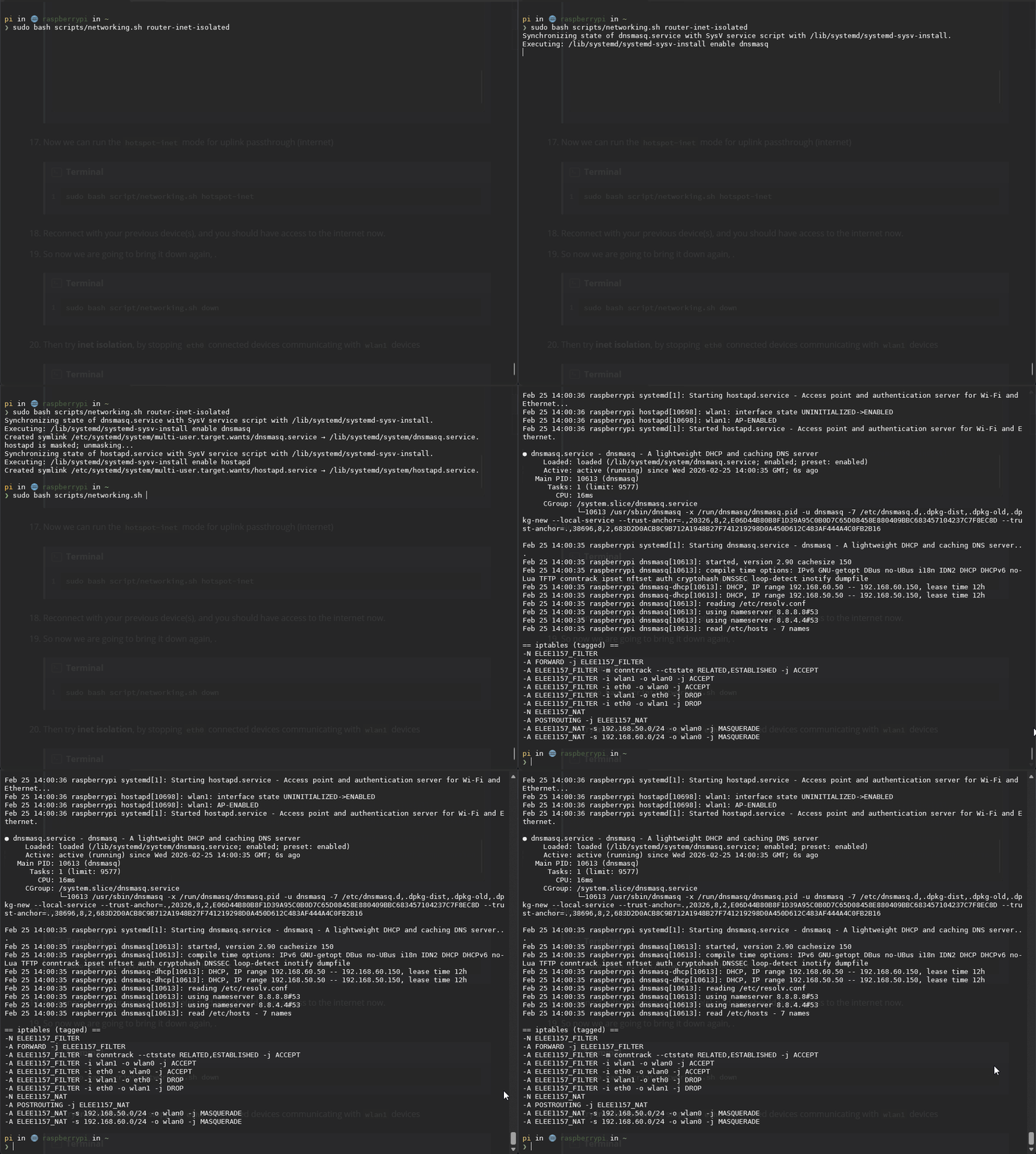
Then try inet isolation, by stopping
eth0connected devices communicating withwlan1devices




Practice
Now that you have the script and it is working, you can quickly bring up or bring down your network settings for the coursework, remember to change ip networks so you can connect to each other.
Full Script
Full code: scripts/networking.sh
Full code: scripts/networking.sh
#!/usr/bin/env bash
set -euo pipefail

# Interfaces
UPLINK_IF="wlan0"
AP_IF="wlan1"
LAN_IF="eth0"

# Subnets (adjust for your lab)
AP_SUBNET="192.168.50.0/24"
AP_GW_IP="192.168.50.1/24"

LAN_SUBNET="192.168.60.0/24"
LAN_GW_IP="192.168.60.1/24"

# Services
HOSTAPD_CONF="/etc/hostapd/hostapd-wlan1.conf"
DNSMASQ_CONF="/etc/dnsmasq.d/lab-router.conf"

# iptables chain tag (so you can cleanly remove rules)
TAG="ELEE1157"

die() { echo "error: $*" >&2; exit 1; }
need_root() { [[ $EUID -eq 0 ]] || die "run as root"; }

# ---------- sysctl ----------
enable_forwarding() {
  sysctl -w net.ipv4.ip_forward=1 >/dev/null
}

# ---------- addressing ----------
ensure_addr() {
  local iface="$1" ip="$2"
  ip link set dev "$iface" up
  if ! ip -4 addr show dev "$iface" | grep -q " ${ip}/"; then
    # remove any previous address in that subnet to avoid duplicates
    # (simple approach: flush IPv4 on that interface; ok for lab routers)
    ip -4 addr flush dev "$iface"
    ip addr add "${ip}" dev "$iface"
  fi
}

# ---------- services ----------
start_services() {
  systemctl enable --now dnsmasq
  if ! systemctl is-enabled hostapd 2>/dev/null | grep -q masked; then
    echo "hostapd is masked; unmasking..."
    systemctl unmask hostapd.service
  fi
  systemctl enable --now hostapd
}

stop_services() {
  systemctl disable --now hostapd || true
  systemctl disable --now dnsmasq || true
}

# ---------- iptables helpers ----------
ipt() { iptables -w "$@"; }

flush_tagged_rules() {
  # Remove only the jumps we actually install, then delete our chains.
  iptables -w -t filter -D FORWARD -j "${TAG}_FILTER" 2>/dev/null || true
  iptables -w -t nat    -D POSTROUTING -j "${TAG}_NAT" 2>/dev/null || true

  iptables -w -t filter -F "${TAG}_FILTER" 2>/dev/null || true
  iptables -w -t filter -X "${TAG}_FILTER" 2>/dev/null || true

  iptables -w -t nat -F "${TAG}_NAT" 2>/dev/null || true
  iptables -w -t nat -X "${TAG}_NAT" 2>/dev/null || true
}

create_tag_chains() {
  # filter chain
  iptables -w -t filter -N "${TAG}_FILTER" 2>/dev/null || true
  iptables -w -t filter -F "${TAG}_FILTER"
  iptables -w -t filter -C FORWARD -j "${TAG}_FILTER" 2>/dev/null || \
    iptables -w -t filter -A FORWARD -j "${TAG}_FILTER"

  # nat chain
  iptables -w -t nat -N "${TAG}_NAT" 2>/dev/null || true
  iptables -w -t nat -F "${TAG}_NAT"
  iptables -w -t nat -C POSTROUTING -j "${TAG}_NAT" 2>/dev/null || \
    iptables -w -t nat -A POSTROUTING -j "${TAG}_NAT"
}

allow_established() {
  ipt -t filter -A "${TAG}_FILTER" -m conntrack --ctstate ESTABLISHED,RELATED -j ACCEPT
}

allow_forward() {
  local in_if="$1" out_if="$2"
  ipt -t filter -A "${TAG}_FILTER" -i "$in_if" -o "$out_if" -j ACCEPT
}

deny_forward() {
  local in_if="$1" out_if="$2"
  ipt -t filter -A "${TAG}_FILTER" -i "$in_if" -o "$out_if" -j DROP
}

enable_nat() {
  local src_subnet="$1" out_if="$2"
  ipt -t nat -A "${TAG}_NAT" -s "$src_subnet" -o "$out_if" -j MASQUERADE
}

# ---------- policy builders ----------
apply_firewall_router() {
  local nat_ap="$1" nat_lan="$2" isolate="$3"

  create_tag_chains
  allow_established

  # Permit uplink return path is handled by ESTABLISHED,RELATED.
  # Allow LAN/AP towards uplink (routing)
  allow_forward "$AP_IF" "$UPLINK_IF"
  allow_forward "$LAN_IF" "$UPLINK_IF"

  # Optionally allow inter-LAN communication
  if [[ "$isolate" == "yes" ]]; then
    deny_forward "$AP_IF" "$LAN_IF"
    deny_forward "$LAN_IF" "$AP_IF"
  else
    allow_forward "$AP_IF" "$LAN_IF"
    allow_forward "$LAN_IF" "$AP_IF"
  fi

  # NAT (internet sharing)
  if [[ "$nat_ap" == "yes" ]]; then
    enable_nat "$AP_SUBNET" "$UPLINK_IF"
  fi
  if [[ "$nat_lan" == "yes" ]]; then
    enable_nat "$LAN_SUBNET" "$UPLINK_IF"
  fi
}

# ---------- modes ----------
mode_ap_only() {
  enable_forwarding
  ensure_addr "$AP_IF" "$AP_GW_IP"
  ensure_addr "$LAN_IF" "$LAN_GW_IP"
  start_services

  flush_tagged_rules
  # routing only inside the box; no NAT; permit/deny AP<->LAN decided by "isolate" flag outside
  apply_firewall_router "no" "no" "no"
}

mode_hotspot_inet() {
  enable_forwarding
  ensure_addr "$AP_IF" "$AP_GW_IP"
  ensure_addr "$LAN_IF" "$LAN_GW_IP"
  start_services

  flush_tagged_rules
  apply_firewall_router "yes" "no" "no"
}

mode_router_inet() {
  enable_forwarding
  ensure_addr "$AP_IF" "$AP_GW_IP"
  ensure_addr "$LAN_IF" "$LAN_GW_IP"
  start_services

  flush_tagged_rules
  apply_firewall_router "yes" "yes" "no"
}

mode_router_inet_isolated() {
  enable_forwarding
  ensure_addr "$AP_IF" "$AP_GW_IP"
  ensure_addr "$LAN_IF" "$LAN_GW_IP"
  start_services

  flush_tagged_rules
  apply_firewall_router "yes" "yes" "yes"
}

mode_down() {
  stop_services
  flush_tagged_rules
  sysctl -w net.ipv4.ip_forward=0 >/dev/null || true

  # Optionally flush addresses on AP/LAN interfaces to “reset lab”
  ip -4 addr flush dev "$AP_IF" || true
  ip -4 addr flush dev "$LAN_IF" || true
}

status() {
  echo "== interfaces =="
  ip -br addr show dev "$UPLINK_IF" || true
  ip -br addr show dev "$AP_IF" || true
  ip -br addr show dev "$LAN_IF" || true

  echo
  echo "== forwarding =="
  sysctl net.ipv4.ip_forward
  echo
  echo "== services =="
  systemctl --no-pager --full status hostapd 2>/dev/null | sed -n '1,18p' || true
  echo
  systemctl --no-pager --full status dnsmasq 2>/dev/null | sed -n '1,18p' || true
  echo
  echo "== iptables (tagged) =="
  iptables -S | grep "$TAG" || true
  iptables -t nat -S | grep "$TAG" || true
}

usage() {
  cat <<EOF
usage: lab-router <mode>

modes:
  ap-only
  hotspot-inet
  router-inet
  router-inet-isolated
  down
  status
EOF
}

main() {
  need_root

  local mode="${1:-}"
  case "$mode" in
    ap-only) mode_ap_only ;;
    hotspot-inet) mode_hotspot_inet ;;
    router-inet) mode_router_inet ;;
    router-inet-isolated) mode_router_inet_isolated ;;
    down) mode_down ;;
    status) status ;;
    *) usage; exit 2 ;;
  esac
}

main "$@"