Integrity - Understanding Hashing and Security
Overview
In this lab, you will explore the concept of hashing and its crucial role in data security. You will engage in both discussions and practical hands-on exercises to gain a deeper understanding of hashing algorithms and their applications. By the end of this lab, you should be able to explain what hashing is, understand its importance in security, and execute basic hashing to verify file integrity.
1. Using Hashing for Integrity Verification
1.1 Bash (Linux/macOS)
-
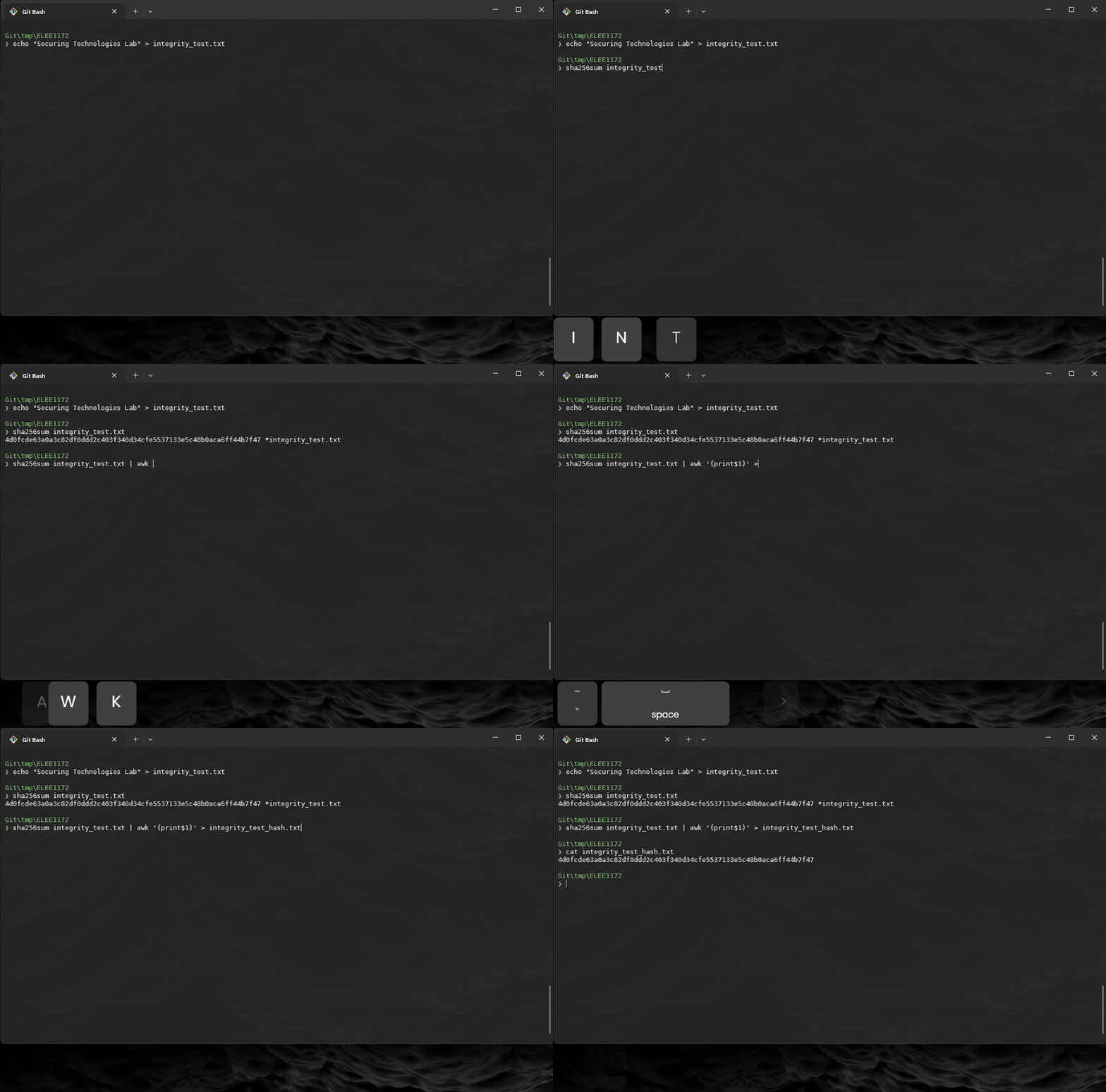
Create a test file:
-
Compute the sha256 hash:
-
Record the hash value.
-
Verify that only the hash in recorded in the file
-
Modify the file:
-
Recompute the hash and observe the change:
-
Record the hash value.
-
Now we can compare the hashes
1.2 PowerShell (Windows)
-
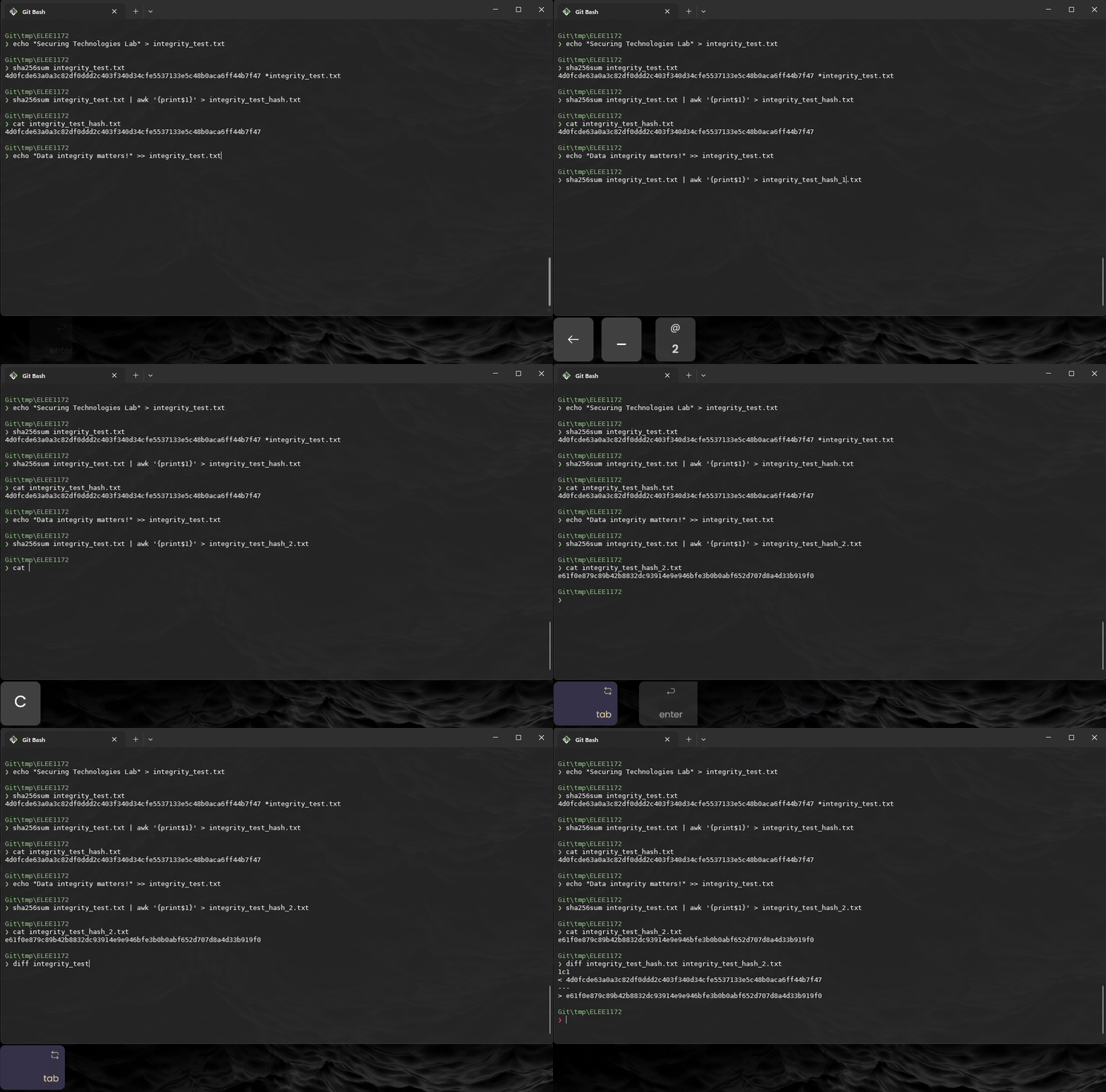
Create a test file:
-
Compute the SHA256 hash:
-
Record the hash value.
-
Modify the file:
-
Recompute the hash and observe the change:
-
Compare
$ Compare-Object (Get-Content integrity_test_hash_1.txt) (Get-Content integrity_test_hash_2.txt) -
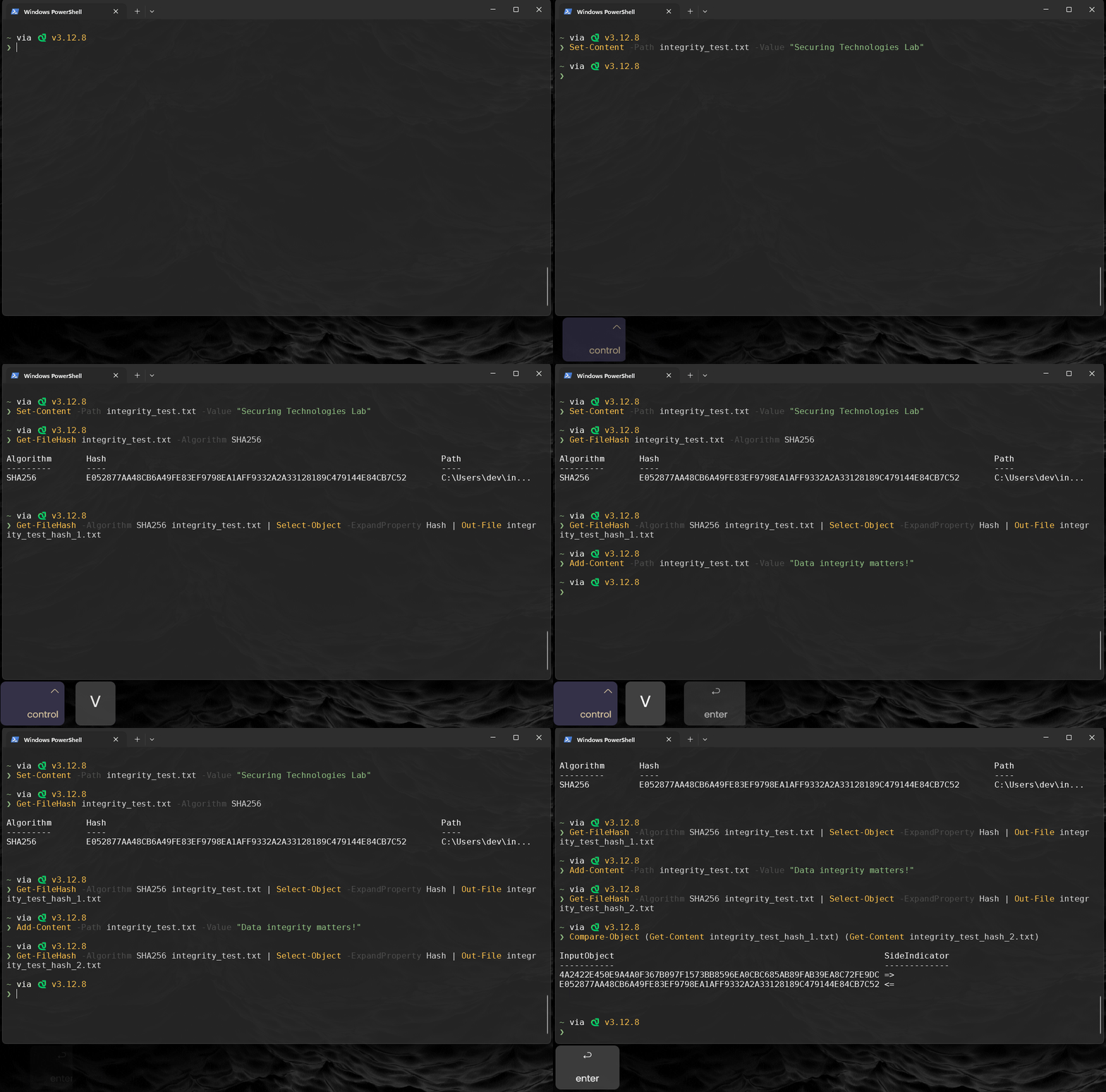
Notice that in both environments, Powershell and Bash, give same hash outputs:
Bash
$ diff integrity_test_hash.txt integrity_test_hash_2.txt
1c1
< 4d0fcde63a0a3c82df0ddd2c403f340d34cfe5537133e5c48b0aca6ff44b7f47
---
> e61f0e879c89b42b8832dc93914e9e946bfe3b0b0abf652d707d8a4d33b919f0
2. Using Digital Signatures for Integrity
The gpg command might not be available in the Windows Powershell shell.
The Following steps will be conducted in the bash terminal
-
A GPG (GNU Privacy Guard) key is a cryptographic key used for encryption, decryption, signing, and verifying data. It consists of:
-
A public key, which can be shared with others to verify signatures or encrypt messages for the owner.
-
A private key, which is kept secret and used for signing files or decrypting messages.
In a later exercise, will explore public and private keys. For now we only need to know how to use the tool.
-
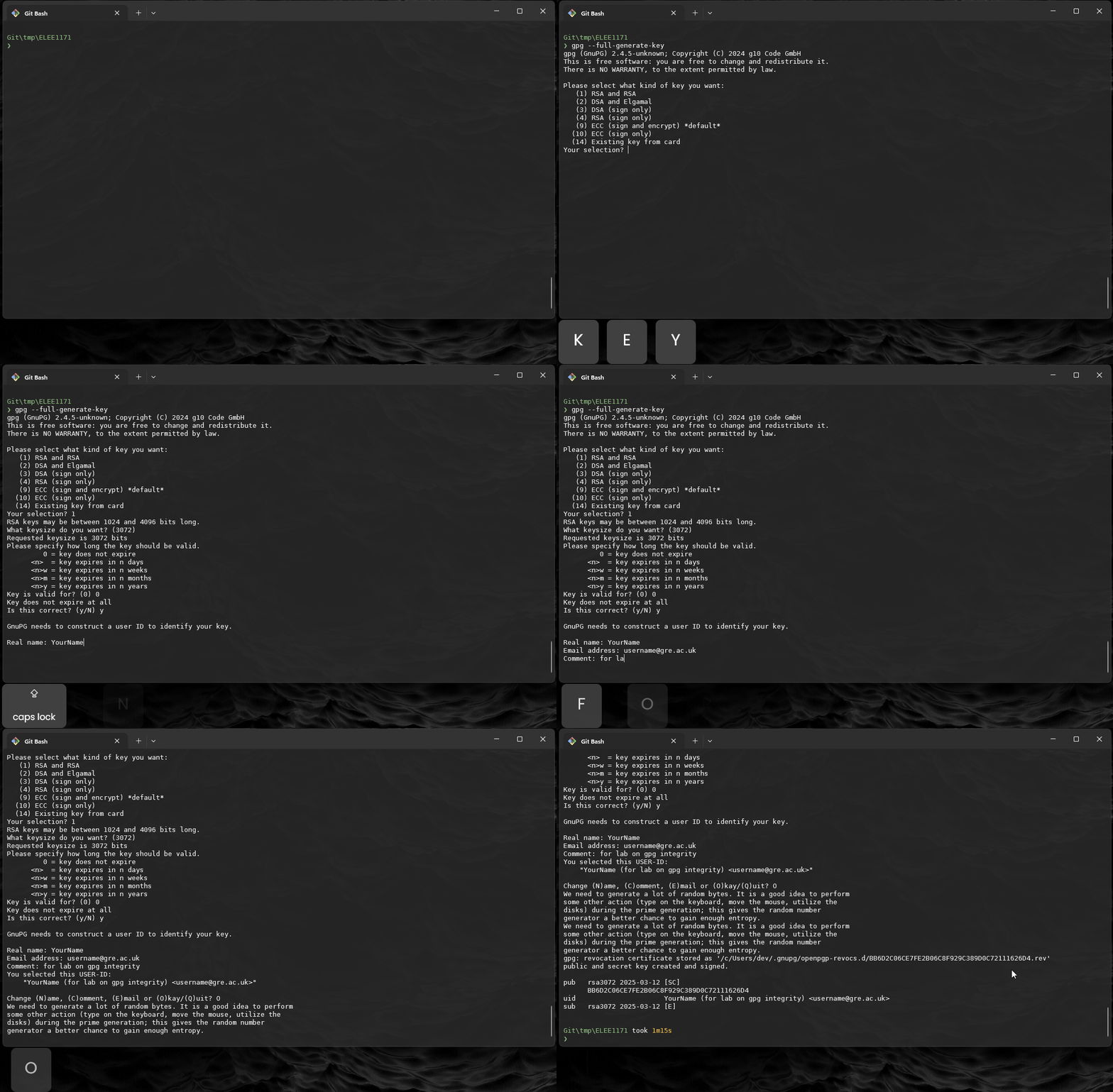
Generate a GPG key (if not already created):
$ gpg --full-generate-keyFollow the on screen instructions:
-
Choose key type: RSA
-
Set key size (2048 or 4096 recommended for security)
-
Enter a validity period
-
Provide a name and email
-
Set a passphrase for the key (eg 123456789)
-
-
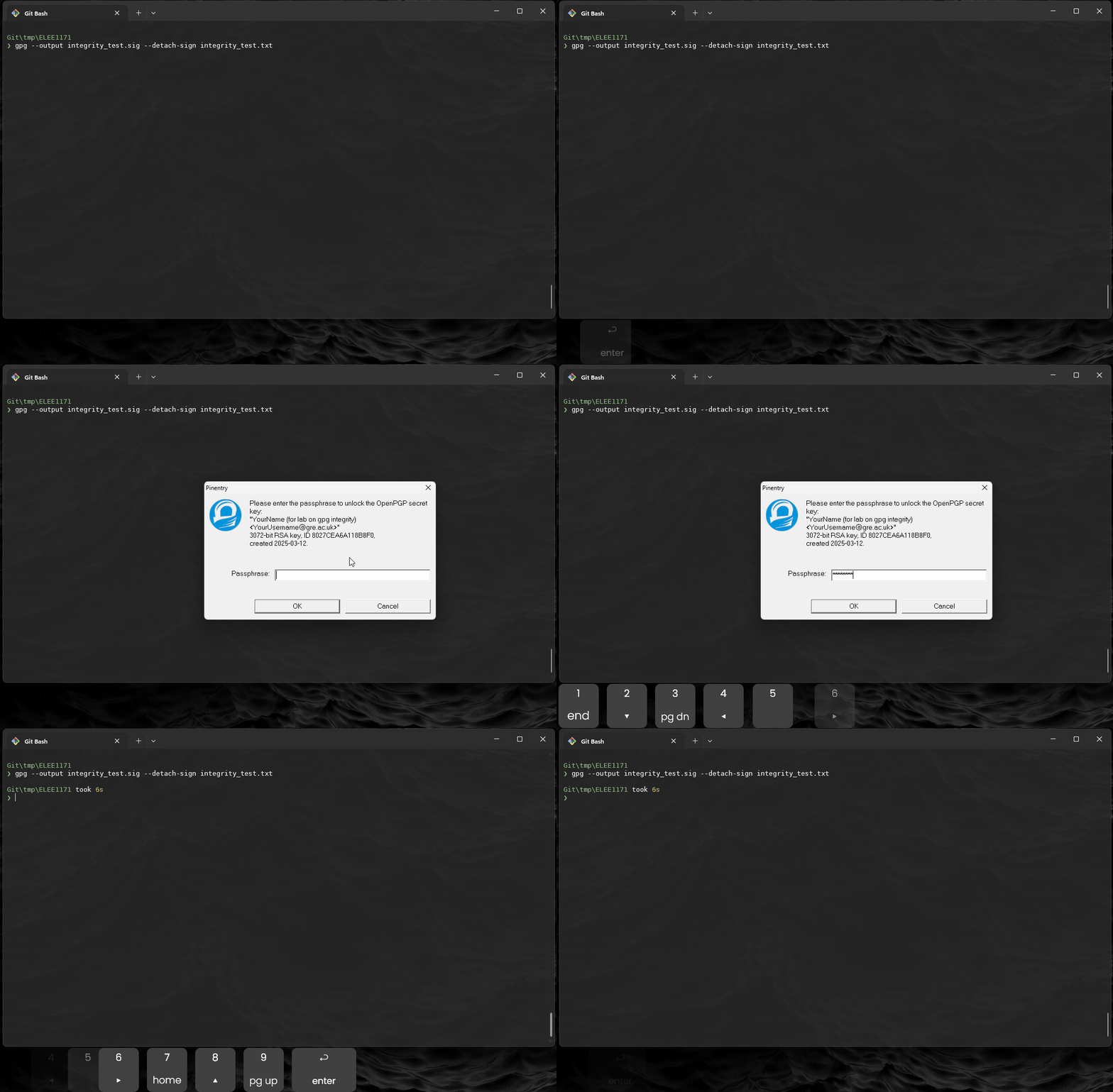
Use gpg to generate a signature:
-
--sign file: Creates a combined signed file (message + signature). -
--detach-signfile: Creates a separate signature (.sigfile), leaving the original file unchanged.
-
-
Check that the
integrity_test.sigexists -
Run the following command to determine the
integrity_test.sig: -
Because it is an octect-stream we know that file is hex or binary file, so we can view some conent using
xxd:Output
00000000: 8901 b304 0001 0800 1d16 2104 ba89 8914 ..........!..... 00000010: ac7f 3fa8 dbdb a378 8027 cea6 a118 b8f0 ..?....x.'...... 00000020: 0502 67d1 e81f 000a 0910 8027 cea6 a118 ..g........'.... 00000030: b8f0 b665 0bff 6df4 8853 c4f6 39cd a4c6 ...e..m..S..9... 00000040: b504 0dff eeef d11f 4008 ffc1 813c 2c21 ........@....<,! 00000050: de95 3bf8 0605 5db2 f25b 0e03 4f6d 5e7a ..;...]..[..Om^z 00000060: 804c 31cd 4a93 6928 54e5 f293 6cfa 58a7 .L1.J.i(T...l.X. 00000070: fb92 25f4 9c95 6644 84bd 8f8d cafc 8562 ..%...fD.......b 00000080: 8534 1743 06a3 e6be c40c 7010 aaf5 cc70 .4.C......p....p 00000090: 427c 8f25 99c0 7430 211a 5504 b075 ef88 B|.%..t0!.U..u.. 000000a0: c3ec fe54 29d3 9655 d315 eaf9 f75b 9c56 ...T)..U.....[.V 000000b0: fa81 91fe 249b eca8 4da2 1925 5625 b7e1 ....$...M..%V%.. 000000c0: f04f 6c0d d10e 5c22 8f5b cbc4 17ac 1ccf .Ol...\".[...... 000000d0: d0e1 ee44 9e67 3275 7cf8 b62c c919 f608 ...D.g2u|..,.... 000000e0: c2da cf0e c3a5 2b3c ffd5 a2f3 592a d0ec ......+<....Y*.. 000000f0: 4e2f cb7a 9820 ec53 e094 e9a1 0ddc 871b N/.z. .S........ 00000100: e841 81f5 c39c 4de7 d5bc b35b acbf 7a1b .A....M....[..z. 00000110: 524d a90c ec93 5ead 64a9 d51d bb56 80fb RM....^.d....V.. 00000120: e51d b302 55be 5c68 4e16 52ca c045 650a ....U.\hN.R..Ee. 00000130: 17dd db8c 9b3a 141d 7b7f 70f0 ac73 3b58 .....:..{.p..s;X 00000140: fe3a 7833 8cf4 ac45 9e55 6421 ec91 8b9c .:x3...E.Ud!.... 00000150: 87be 84f9 b9a9 13cf 434d 9277 e01c 3422 ........CM.w..4" 00000160: 7373 bd05 f7d6 0fe7 26ae 9de3 9a44 b2ab ss......&....D.. 00000170: 069d 6a65 ac35 5ae1 2f6a a4ad 11a2 510f ..je.5Z./j....Q. 00000180: 2334 87f2 925b e0a6 d2e5 ed3c 2069 d55e #4...[.....< i.^ 00000190: ce3c 9fe9 8955 69d8 9b2a da62 0eb4 e15e .<...Ui..*.b...^ 000001a0: 6136 1fde 9ff6 7365 e35c b971 f103 0892 a6....se.\.q.... 000001b0: 7db9 87fa c881 }.....A
.sigfile is a detached digital signature generated by GPG. It is used to verify the authenticity and integrity of a file without modifying the original file. The.sigfile contains:-
A cryptographic hash of the signed file
-
The digital signature of the file created using the signer's private key
Using a
.sigfile ensures that any modifications to the original file can be detected when verified against the signature. -
-
Now verify the
integrity_test.txtwith theintergity_test.sig:Output
gpg: Signature made Wed, Mar 12, 2025 8:01:35 PM GMTST gpg: using RSA key BA898914AC7F3FA8DBDBA3788027CEA6A118B8F0 gpg: checking the trustdb gpg: marginals needed: 3 completes needed: 1 trust model: pgp gpg: depth: 0 valid: 1 signed: 0 trust: 0-, 0q, 0n, 0m, 0f, 1u gpg: Good signature from "YourName (for lab on gpg integrity) <YourUsername@gre.ac.uk>" [ultimate] -
If you run the command again, you should get a simplified output:
-
Modify the
integrity_file.txtand rerun thegpgcommand. -
GPG checks the file by running the key over it again to see if the same output is produced, it not then the integrity of the file is compromised.
3. Understanding the SHA256 algorithm
In this section, we will construct the SHA-256 algorithm step by step, understanding the mathematical principles behind each operation.
SHA-256 is a cryptographic hash function that takes an input and produces a fixed 256-bit hash output. The process involves:
-
Padding the message to a multiple of 512 bits.
-
Parsing the message into 512-bit chunks.
-
Processing each chunk using a sequence of bitwise operations.
-
Producing a final 256-bit hash.
3.1 Padding the Message
SHA-256 requires that the input length be a multiple of 512 bits. We achieve this by:
-
Appending a 1-bit (
0x80in hex) to the message. -
Appending zero bits until the length is 448 bits (mod 512).
-
Appending the original message length as a 64-bit integer.
-
Create a python script called
mysha256sum.py -
Edit the file with application of your choice, here we are using
vimvia the command line:import struct def pad_message(message): """Pads the message to fit SHA-256 specifications.""" message = bytearray(message, 'utf-8') original_length = len(message) * 8 # Message length in bits message.append(0x80) # Append '1' bit while (len(message) * 8 + 64) % 512 != 0: message.append(0) # Append '0' bits message += struct.pack('>Q', original_length) # Append length as 64-bit integer return message # Example msg = "Hello, World!" padded_msg = pad_message(msg) print(f"Padded message: {padded_msg.hex()}") -
Once you have done experimenting with this fucntion remove the lines:
-
Test the program:
3.2 Message Parsing and Processing
The padded message is split into 512-bit chunks, each divided into 16 words (32-bit integers). These words are expanded into 64 words using bitwise operations.
-
Reproduce the following code in directly after pad_message() definition:
....

def right_rotate(value, bits):
    """Right rotate (circular shift) a 32-bit integer."""
    return (value >> bits) | (value << (32 - bits)) & 0xFFFFFFFF

def message_schedule(chunk):
    """Expands 16 words into 64 words for SHA-256 processing."""
    w = [0] * 64
    for i in range(16):
        w[i] = struct.unpack('>I', chunk[i * 4:(i + 1) * 4])[0]
    for i in range(16, 64):
        s0 = right_rotate(w[i - 15], 7) ^ right_rotate(w[i - 15], 18) ^ (w[i - 15] >> 3)
        s1 = right_rotate(w[i - 2], 17) ^ right_rotate(w[i - 2], 19) ^ (w[i - 2] >> 10)
        w[i] = (w[i - 16] + s0 + w[i - 7] + s1) & 0xFFFFFFFF
    return w

...
3.3 Understanding an Computing the SHA256 Constants
SHA-256 Constants Explained
The SHA-256 constants used in the algorithm are derived from:
-
the first 32 bits of the fractional parts of the cube roots of the first 64 prime numbers.
-
the first 32 bits of the fractional parts of the square roots of the first 8 primes
-
Manually Computing a SHA-256 Constant using the cube root of the first prime number
We take the cube root of a prime number, extract the fractional part, and convert it into a 32-bit binary integer.
- Compute the cube root of 2 (the first prime number):
\[ 2^{1/3} = 1.2599210498948732\]
- Extract the fractional part:
\[0.2599210498948732\]
- Convert to a 32-bit integer:
\[ 1,116,352,408 = 2^{32}\cdot 0.2599210498948732\]
- Convert to HEX representation
\[ 0x428A2F98_{16} \equiv 1,116,352,408_{10}\]
-
Manually Computing a SHA-256 Constant
We take the square root of a prime number, extract the fractional part, and convert it into a 32-bit binary integer.
-
Compute the square root of 2 (the first prime number):
\[ \sqrt{2} = 1.4142135623730951\]
-
Extract the fractional part:
\[0.41421356237309515\]
-
Convert to a 32-bit integer:
\[ 1,779,033,703 = 2^{32}\cdot 0.41421356237309515\]
-
Convert to HEX representation
\[ 0x6A09E667_{16} \equiv 1,779,033,703_{10}\]
-
-
Add the following Constants to mysha256sum.py, place the following code directly underneath the
import structline:... # SHA-256 Constants: First 32 bits of the fractional # parts of the cube roots of the first 64 primes K = [ 0x428a2f98, 0x71374491, 0xb5c0fbcf, 0xe9b5dba5, 0x3956c25b, 0x59f111f1, 0x923f82a4, 0xab1c5ed5, 0xd807aa98, 0x12835b01, 0x243185be, 0x550c7dc3, 0x72be5d74, 0x80deb1fe, 0x9bdc06a7, 0xc19bf174, 0xe49b69c1, 0xefbe4786, 0x0fc19dc6, 0x240ca1cc, 0x2de92c6f, 0x4a7484aa, 0x5cb0a9dc, 0x76f988da, 0x983e5152, 0xa831c66d, 0xb00327c8, 0xbf597fc7, 0xc6e00bf3, 0xd5a79147, 0x06ca6351, 0x14292967, 0x27b70a85, 0x2e1b2138, 0x4d2c6dfc, 0x53380d13, 0x650a7354, 0x766a0abb, 0x81c2c92e, 0x92722c85, 0xa2bfe8a1, 0xa81a664b, 0xc24b8b70, 0xc76c51a3, 0xd192e819, 0xd6990624, 0xf40e3585, 0x106aa070, 0x19a4c116, 0x1e376c08, 0x2748774c, 0x34b0bcb5, 0x391c0cb3, 0x4ed8aa4a, 0x5b9cca4f, 0x682e6ff3, 0x748f82ee, 0x78a5636f, 0x84c87814, 0x8cc70208, 0x90befffa, 0xa4506ceb, 0xbef9a3f7, 0xc67178f2 ] # Initial Hash Values (First 32 bits of the fractional # parts of the square roots of the first 8 primes) H = [ 0x6a09e667, 0xbb67ae85, 0x3c6ef372, 0xa54ff53a, 0x510e527f, 0x9b05688c, 0x1f83d9ab, 0x5be0cd19 ] ...
3.3 Compression Function
We can now use the SHA256 Constants perform 64 bitwise transformations on each chunk. These transformations include:
-
Right rotations to create diffusion.
-
Choice (ch) function to introduce non-linearity.
-
Majority (maj) function to ensure avalanche effects.
-
After the last function in the
mysha256sum.pyplace the following algorithm... def sha256_process_chunk(chunk, H): """Processes a 512-bit chunk using SHA-256 compression rounds.""" w = message_schedule(chunk) a, b, c, d, e, f, g, h = H for i in range(64): S1 = right_rotate(e, 6) ^ right_rotate(e, 11) ^ right_rotate(e, 25) ch = (e & f) ^ (~e & g) temp1 = (h + S1 + ch + K[i] + w[i]) & 0xFFFFFFFF S0 = right_rotate(a, 2) ^ right_rotate(a, 13) ^ right_rotate(a, 22) maj = (a & b) ^ (a & c) ^ (b & c) temp2 = (S0 + maj) & 0xFFFFFFFF h, g, f, e, d, c, b, a = g, f, e, (d + temp1) & 0xFFFFFFFF, c, b, a, (temp1 + temp2) & 0xFFFFFFFF return [(x + y) & 0xFFFFFFFF for x, y in zip(H, [a, b, c, d, e, f, g, h])] ...
3.4 Producing the Final Hash
Once all chunks are processed, the final 256-bit hash is constructed from the updated 8 hash values.
-
Modify the end of the script:
def sha256(data):
    """Full implementation of SHA-256."""
    data = pad_message(data)
    hash_values = H.copy()
    for chunk_start in range(0, len(data), 64):
        hash_values = sha256_process_chunk(data[chunk_start:chunk_start + 64], hash_values)
    return ''.join(f"{h:08x}" for h in hash_values)

input_data = input("Enter text to hash: ")
print(f"{sha256(input_data)}")
mysha256sum.py, 81 lines
import struct

# SHA-256 Constants: First 32 bits of the fractional
# parts of the cube roots of the first 64 primes
K = [
    0x428a2f98, 0x71374491, 0xb5c0fbcf, 0xe9b5dba5,
    0x3956c25b, 0x59f111f1, 0x923f82a4, 0xab1c5ed5,
    0xd807aa98, 0x12835b01, 0x243185be, 0x550c7dc3,
    0x72be5d74, 0x80deb1fe, 0x9bdc06a7, 0xc19bf174,
    0xe49b69c1, 0xefbe4786, 0x0fc19dc6, 0x240ca1cc,
    0x2de92c6f, 0x4a7484aa, 0x5cb0a9dc, 0x76f988da,
    0x983e5152, 0xa831c66d, 0xb00327c8, 0xbf597fc7,
    0xc6e00bf3, 0xd5a79147, 0x06ca6351, 0x14292967,
    0x27b70a85, 0x2e1b2138, 0x4d2c6dfc, 0x53380d13,
    0x650a7354, 0x766a0abb, 0x81c2c92e, 0x92722c85,
    0xa2bfe8a1, 0xa81a664b, 0xc24b8b70, 0xc76c51a3,
    0xd192e819, 0xd6990624, 0xf40e3585, 0x106aa070,
    0x19a4c116, 0x1e376c08, 0x2748774c, 0x34b0bcb5,
    0x391c0cb3, 0x4ed8aa4a, 0x5b9cca4f, 0x682e6ff3,
    0x748f82ee, 0x78a5636f, 0x84c87814, 0x8cc70208,
    0x90befffa, 0xa4506ceb, 0xbef9a3f7, 0xc67178f2
]

# Initial Hash Values (First 32 bits of the fractional
# parts of the square roots of the first 8 primes)
H = [
    0x6a09e667, 0xbb67ae85, 0x3c6ef372, 0xa54ff53a,
    0x510e527f, 0x9b05688c, 0x1f83d9ab, 0x5be0cd19
]

def pad_message(message):
    """Pads the message to fit SHA-256 specifications."""
    message = bytearray(message, 'utf-8')
    original_length = len(message) * 8  # Message length in bits
    message.append(0x80)  # Append '1' bit
    while (len(message) * 8 + 64) % 512 != 0:
        message.append(0)  # Append '0' bits
    message += struct.pack('>Q', original_length)  # Append length as 64-bit integer
    return message

def right_rotate(value, bits):
    """Right rotate (circular shift) a 32-bit integer."""
    return (value >> bits) | (value << (32 - bits)) & 0xFFFFFFFF

def message_schedule(chunk):
    """Expands 16 words into 64 words for SHA-256 processing."""
    w = [0] * 64
    for i in range(16):
        w[i] = struct.unpack('>I', chunk[i * 4:(i + 1) * 4])[0]
    for i in range(16, 64):
        s0 = right_rotate(w[i - 15], 7) ^ right_rotate(w[i - 15], 18) ^ (w[i - 15] >> 3)
        s1 = right_rotate(w[i - 2], 17) ^ right_rotate(w[i - 2], 19) ^ (w[i - 2] >> 10)
        w[i] = (w[i - 16] + s0 + w[i - 7] + s1) & 0xFFFFFFFF
    return w

def sha256_process_chunk(chunk, H):
    """Processes a 512-bit chunk using SHA-256 compression rounds."""
    w = message_schedule(chunk)
    a, b, c, d, e, f, g, h = H

    for i in range(64):
        S1 = right_rotate(e, 6) ^ right_rotate(e, 11) ^ right_rotate(e, 25)
        ch = (e & f) ^ (~e & g)
        temp1 = (h + S1 + ch + K[i] + w[i]) & 0xFFFFFFFF
        S0 = right_rotate(a, 2) ^ right_rotate(a, 13) ^ right_rotate(a, 22)
        maj = (a & b) ^ (a & c) ^ (b & c)
        temp2 = (S0 + maj) & 0xFFFFFFFF

        h, g, f, e, d, c, b, a = g, f, e, (d + temp1) & 0xFFFFFFFF, c, b, a, (temp1 + temp2) & 0xFFFFFFFF

    return [(x + y) & 0xFFFFFFFF for x, y in zip(H, [a, b, c, d, e, f, g, h])]

def sha256(data):
    """Full implementation of SHA-256."""
    data = pad_message(data)
    hash_values = H.copy()
    for chunk_start in range(0, len(data), 64):
        hash_values = sha256_process_chunk(data[chunk_start:chunk_start + 64], hash_values)
    return ''.join(f"{h:08x}" for h in hash_values)

input_data = input("Enter text to hash: ")
print(f"{sha256(input_data)}")
3.5 Running and verify it works
-
Now you need to verify that the algorithm works,
-
We can validate against the builtin sha256sum command in the shell
-
Run the builtin like this:
If you have followed the instructions you should have exactly the same output!
-
-
Try the following