Lab 1: Introduction to Kotlin
-
You will be using IntelliJ IDE
-
From your Start Menu type 'IntelliJ' and select run!
-
If you want to run this on your own machine you can download the community Edition from here -> https://www.jetbrains.com/idea/download/?section=windows
1. Getting Started
-
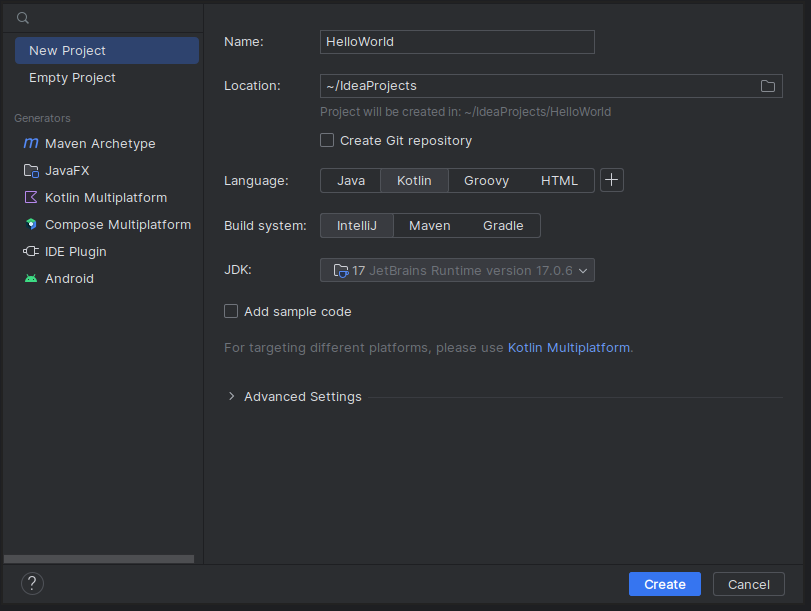
Once opened you will be greeted with the landing page:

-
Select New Project
-
Modify the Name to HelloWorld
-
Change Language to Kotlin
-
Uncheck Add sample code
-
Click Create
-
-
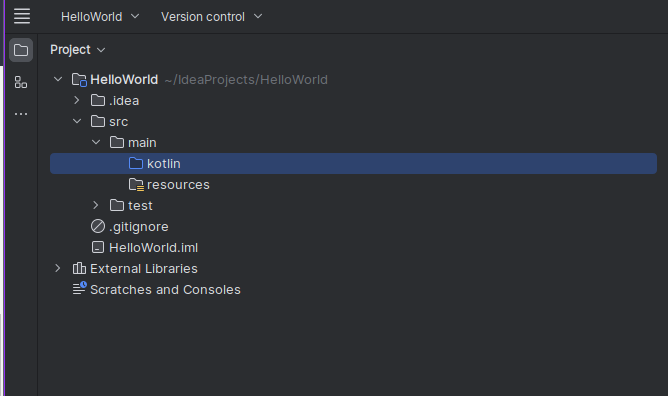
Once loaded (can take a few minutes) you will see the following project structure:
-
Adding a Kotlin Class file
- Right-click the highlighted Kotlin folder in the previous image
- Once the context menu opens click 'New' and then Kotlin Class/file
-
Create a new File file called
Main

-
Now we can populate our new
Main.ktfile with some code. -
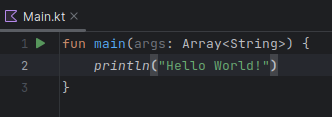
Write the following:
-
funis a hard keyword that tells the Kotlin you are declaring a function. -
main()is the function name, and any console-based program like this,main(), is the entry point of the program when it is executed by the OS. -
(args: Array<String>), is the way of telling the program that it can take in arguments supplied to it, in this instanceargs, the variable, will be anArrayof strings` -
Everything between the
{}braces is executed by the program. -
Lastly,
println("Hello World!"), calls the functionprintln()which prints whatever is in the brackets to the terminal with a\nnew line at the end hence in thelninprintln.
-
-
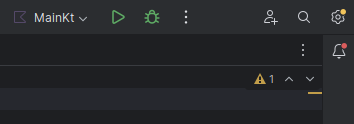
Now you can run the program using either of the green arrows:
-
You should see a terminal appear at the bottom of the IDE that shows some output.

-
Now you are going to modify the programme so that
printl()takes a variable
-
Create a mutable variable called
name
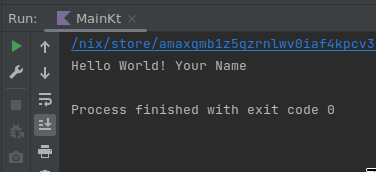
- Run and you should see the following output
- Notice the green under-wave underneath the
println("Hello World! " + name)
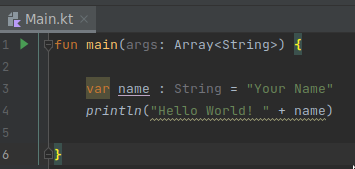
You can find more if you go to File>Settings>Editor>Color Scheme > General > Errors and Warnings
- Green = typo, literals, weak warnings
- Red = Error (will not compile)
-
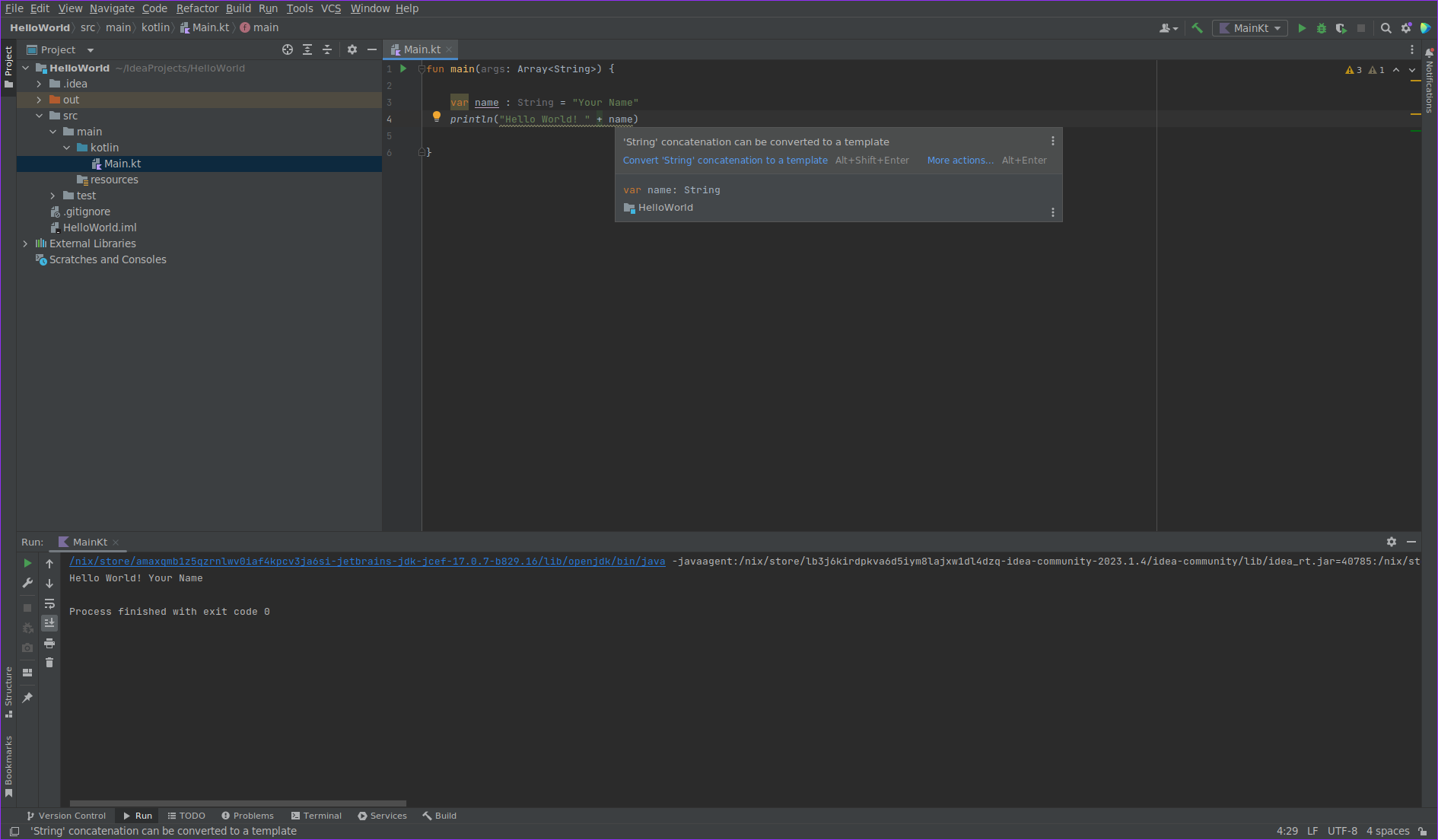
This underwave can be corrected two ways, either hover over and follow the quick key shortcut 'Alt+Shift+Enter'. Or Manually fix it by reproducing the output below.
-
You will see the that
println("Hello World! " + name)has been refactored to: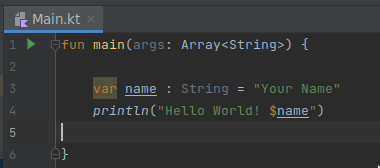
-
String literals may contain template expressions – pieces of code that are evaluated and whose results are concatenated into the string.
-
A template expression starts with a dollar sign
$and consists of either a name -
or an expression in curly braces:
-
Run the program again, do you get the same output?
-
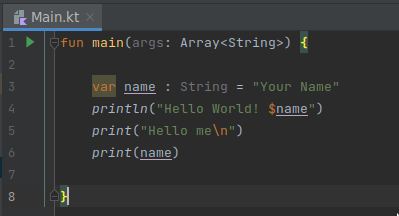
Modify further with
print()function
-
print()by default does not terminate with a new line (\n) line character, unlikeprintln() -
however, you can tell it to, by adding a
\nto the end of the message inbetweent the two brackets.
- Run it and see for yourself, then remove the
\nfrom the end ofprint("Hello me\n), is it the same?
2 Mutable and immutable
-
varis a general variable and it's known as a mutable variable in Kotlin and can be assigned multiple times. -
valis a final variable and it's known as immutable in Kotlin and can be initialised only a single time. -
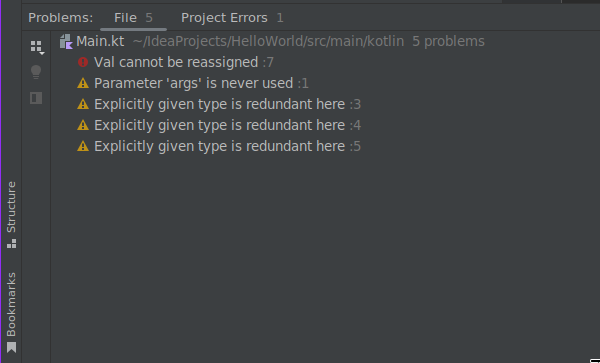
Since you started we have been using
varto define the variablename, this is technically incorrect, because we never change the value after declaration. -
Let's change this to
valto make our code more clean. -
Reproduce the following:
-
Before running to code, predict what the outcome will be. Now run it, does it match your prediction?
-
Modify the above code so that it looks like this:
-
Before running to code, predict what the outcome will be. Now run it, does it match your prediction?
-
Now let's change how
cis declared, modifycso thatvaris nowval: -
Before running to code, predict what the outcome will be? Now run it, does it match your prediction?
3. Data types
- Remember from the lecture that data types are as follows:
-
Numbers (six built-in types)
- Byte [ \(-127\) to \(128\) ]
- Short [ \(-32768\) to \(32767\) ]
- Int [ \(-2^{31}\) to \(2^{31}-1\) ]
- Long [ \(-2^{63}\) to \(2^{63}-1\) ]
- Float [ \(2^{32}\) ]
- Double [ \(2^{64}\) ]
-
Characters
- Chars [ \(2^{16}\) ]
- because Unicode instead of just ASCII
\u0000,\uFFFF
- Chars [ \(2^{16}\) ]
-
Booleans
- true
- false
- Although 1 bit (1,0), it is technically a Byte.
-
Arrays
- get
- set
- size
- length
- etc...
-
Strings
- A class, not technically a data type
-
Let's check the maximum and minimum values available to you on your machine or VM
-
Start your program off as follows and run:
fun main(args: Array<String>) { val b1: Byte = Byte.MIN_VALUE val b2: Byte = Byte.MAX_VALUE println("Smallest signed byte value: " +b1) println("Largest signed byte value: " +b2) val ub1: UByte = UByte.MIN_VALUE val ub2: UByte = UByte.MAX_VALUE println("Smallest unsigned byte value: " +ub1) println("Largest unsigned byte value: " +ub2) println("--------------------------------------------------") } -
Now repeat for each data type, remembering to include signed and unsigned variants:
-
Short,Char,Int,Long,FloatandDouble-
Charwill need to be cast as anInt -
FloatandDoublecan only be signed -
eg.
val someVal: dataTypeYouWant = originalDataType
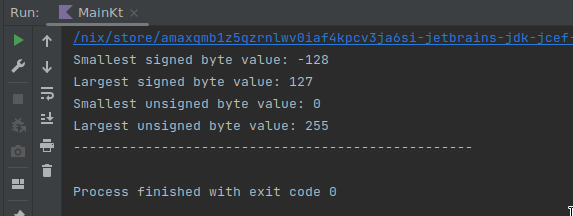
- When done, you should get the same output as below:Whole code, do it yourself first... [66 lines]
```kt fun main(args: Array<String>) { val b1: Byte = Byte.MIN_VALUE val b2: Byte = Byte.MAX_VALUE println("Smallest signed byte value: " +b1) println("Largest signed byte value: " +b2) val ub1: UByte = UByte.MIN_VALUE val ub2: UByte = UByte.MAX_VALUE println("Smallest unsigned byte value: " +ub1) println("Largest unsigned byte value: " +ub2) println("--------------------------------------------------") val s1: Short = Short.MIN_VALUE val s2: Short = Short.MAX_VALUE println("Smallest signed short value: " +s1) println("Largest signed short value: " +s2) val us1: UShort = UShort.MIN_VALUE val us2: UShort = UShort.MAX_VALUE println("Smallest unsigned short value: " +us1) println("Largest unsigned short value: " +us2) println("--------------------------------------------------") val c1: Int = Char.MIN_VALUE.code val c2: Int = Char.MAX_VALUE.code println("Smallest Char value: " + c1) println("Largest Char value: " + c2) println("--------------------------------------------------") val i1: Int = Int.MIN_VALUE val i2: Int = Int.MAX_VALUE println("Smallest signed integer value: " +i1) println("Largest signed integer value: " +i2) val ui1: UInt = UInt.MIN_VALUE val ui2: UInt = UInt.MAX_VALUE println("Smallest unsigned integer value: " +ui1) println("Largest unsigned integer value: " +ui2) println("--------------------------------------------------") val l1: Long = Long.MIN_VALUE val l2: Long = Long.MAX_VALUE println("Smallest signed long integer value: " +l1) println("Largest signed long integer value: " +l2) val ul1: ULong = ULong.MIN_VALUE val ul2: ULong = ULong.MAX_VALUE println("Smallest unsigned long integer value: " +ul1) println("Largest unsigned long integer value: " +ul2) println("--------------------------------------------------") val F1: Float = Float.MIN_VALUE val F2: Float = Float.MAX_VALUE println("Smallest Float value: " +F1) println("Largest Float value: " + F2) val D1: Double = Double.MIN_VALUE val D2: Double = Double.MAX_VALUE println("Smallest Double value: " + D1) println("Largest Double value: " + D2) } ``` ~~~Output
Smallest signed byte value: -128 Largest signed byte value: 127 Smallest unsigned byte value: 0 Largest unsigned byte value: 255 -------------------------------------------------- Smallest signed short value: -32768 Largest signed short value: 32767 Smallest unsigned short value: 0 Largest unsigned short value: 65535 -------------------------------------------------- Smallest Char value: 0 Largest Char value: 65535 -------------------------------------------------- Smallest signed integer value: -2147483648 Largest signed integer value: 2147483647 Smallest unsigned integer value: 0 Largest unsigned integer value: 4294967295 -------------------------------------------------- Smallest signed long integer value: -9223372036854775808 Largest signed long integer value: 9223372036854775807 Smallest unsigned long integer value: 0 Largest unsigned long integer value: 18446744073709551615 -------------------------------------------------- Smallest Float value: 1.4E-45 Largest Float value: 3.4028235E38 Smallest Double value: 4.9E-324 Largest Double value: 1.7976931348623157E308 Process finished with exit code 0 -
-
-
-
Arrays
- You can have an array of any data type
- They are stored in contiguous memory locations.
- They can be accessed programmatically through their indexes (array[1], array[0], etc.)
- They are mutable (
val). - Their size is fixed.
-
val num = arrayOf(1, 2, 3, 4) //implicit type declaration -
val num = arrayOf<Int>(1, 2, 3) //explicit type declaration -
val sentence = String: "This is a sentence." // Strings are an array of characters
-
Reproduce the following to experiment with the various iterations of array manipulation:
1 var sentence :String = "This is a sentence" 2 3 for (i in 0 ..< sentence.length) 4 { 5 print(" "+sentence[i]) 6 }-
A reminder that a
Stringis a sequence or an array of characters. -
The
foris a keyword that enables the iteration through anything that provides an iterator. Here the iterator is theia variable that iterates through a supplied list, collection, enumerable, or objects. -
After the opening bracket
( ithe next keyword isinand is considered an operator, hereinis to used to iterate over the length ofsentenceexecuting theprint(..)method, untiliis less than,<, the length.
-
-
Another way to write the for loop:
A slight difference here is that instead of iterating using an iterator with an integer to a specified length we iterate over all elements of the object or list. The use of the word
elementis not reserved, and you could replace this with anything that makes sense, as long as it is not another keyword:1 var sentence :String = "This is a sentence" 2 3 for (element in sentence) 4 { 5 print(" "+ element) 6 }1 var sentence :String = "This is a sentence" 2 3 for (characters in sentence) 4 { 5 print(" "+ characters) 6 }Run this code either way and you should still receive the same output as before:
-
An array can be defined, explicitly or implicitly by doing the following:
-
Another way to iterate over the array is to do the following:
Question: Notice anything different than before?
-
0.rangeTo(...) -
This is technically an operator function, where the preceding number
0can be any number less than the range provided in the arguments to the function. -
explicitArray.size, wheresizeis an attribute of the array, much likelengthwas tosentenceearlier. We minus 1 from the size because arrays are 0 indexed. Meaning that while there are 5 indices in theexplicitArrayit starts at at index 0 and goes to 4, which is a total of 5. -
modify the code and run it again to see why we need to subtract 1.
for (i in 0.rangeTo(explicitArray.size))
{
   print(" "+explicitArray[i])
}
-
4. Conditionals
We are going to make a series of if statements to verify login details.
Reproduce the following:
Code... [36 lines]
Code... [36 lines]
fun main() {

   var showAccountPage : Boolean = false
   var user : Boolean = false
   var password : Boolean = false

   val userName : String = "AUsername"
   val userPassword: String = "1c4n234d13375p34k!" // if you know, you know...

   var inputtedUserName : String? = ""
   var inputtedPassword : String? = ""

   println("Username: ")
   inputtedUserName = readlnOrNull()
   println("Password: ")
   inputtedPassword = readlnOrNull()

   if (userName == inputtedUserName )
   {
      user = true
      if(userPassword == inputtedPassword){
            password = true
            if (user == true && password == true)
            {
               showAccountPage = true
               print("Successfully logged in")
            }
      }
      else{
            print("Password does not match: $inputtedPassword")
      }
   }
   else{
      print("Username does not match: $inputtedUserName")
   }
}
Breaking the code down:
-
Booleans
showAccountPage: ABooleanvariable indicating whether the account page should be displayed. It is set totrueonly if both username and password match the predefined values.user: ABooleanvariable indicating whether the inputted username matches the predefined username. It is set totrueif the usernames match.password: ABooleanvariable indicating whether the inputted password matches the predefined password. It is set totrueif the passwords match.
-
Strings
userName: A predefinedStringcontaining the correct username.userPassword: A predefinedStringcontaining the correct password.
-
Inputs
inputtedUserName: AStringvariable to store the username input by the user.inputtedPassword: AStringvariable to store the password input by the user. Note that both of these are nullable,?, meaning that if notStringis supplied it is not going to crash
-
Nested
if- While the code will work as intended, readability is the issue, we have a three deep
if.userNameis checked, if a match, thenpassword, if a match, then account page.
- While the code will work as intended, readability is the issue, we have a three deep
Run the code and try to login using the correct and incorrect credentials.
Let's refactor the code and reduce the number of nested if statements:
Code... [31 lines]
Code... [31 lines]
fun main() {

   var showAccountPage = false
   var user = false
   var password = false

   val userName = "AUsername"
   val userPassword = "1c4n234d13375p34k!" // if you know, you know...

   println("Username: ")
   val inputtedUserName = readlnOrNull()
   println("Password: ")
   val inputtedPassword = readlnOrNull()

   if (userName == inputtedUserName) {
      user = true
   }

   if (userPassword == inputtedPassword) {
      password = true
   }

   if (user && password) {
      showAccountPage = true
      println("Successfully logged in")
   }
   else {
      println("Username and or Password does not match")
      exitProcess(1)
   }
}